

30–90 Day Video Retention Requirements for U.S. Security Teams
There’s no single federal law dictating how long a private business must keep video, so the safest baseline for most organizations is 30 to 90 days of raw footage, extended whenever an incident, complaint, or claim makes preservation likely. That extension isn’t optional once it applies: a legal hold overrides any automatic deletion schedule the moment litigation becomes reasonably foreseeable. Anchor your policy to what regulated entities already do, including FDIC banking guidance, Colorado’s body-worn camera retention framework, and Princeton University’s published camera policy.
TL;DR:
- Most organizations should retain video footage for 30 to 90 days, with longer periods required if incidents or claims are likely or ongoing.
- Retention durations vary by camera type and risk profile, with regulated industries often requiring 90 days to over a year, especially for law enforcement or gambling entities.
- Federal and state regulations create a patchwork of retention rules; law enforcement recordings are subject to public records law, which can override normal deletion timelines.
- Effective policies must be documented, assign clear roles, and include procedures for legal holds, evidence handling, redaction, and access control.
- Hardware and storage systems must be configured to support retention policies, with modern systems enabling policy-driven deletion and tiered cloud storage to meet target durations.
Table of Contents
- Video Retention Requirements by Camera Class and Sector
- Why U.S. Video Retention Laws Vary by State and Sector
- Building a Legally Defensible Video Retention Policy
- Storage Architecture That Actually Matches Your Retention Policy
- Chain of Custody, Access Control, and Disclosure Rules
- A Quick-Reference Retention Checklist
- Why Retention Planning Belongs in Procurement, Not Just Policy
- Storage That Matches Your Retention Policy, Not the Other Way Around
- Sources
- FAQ
Video Retention Requirements by Camera Class and Sector
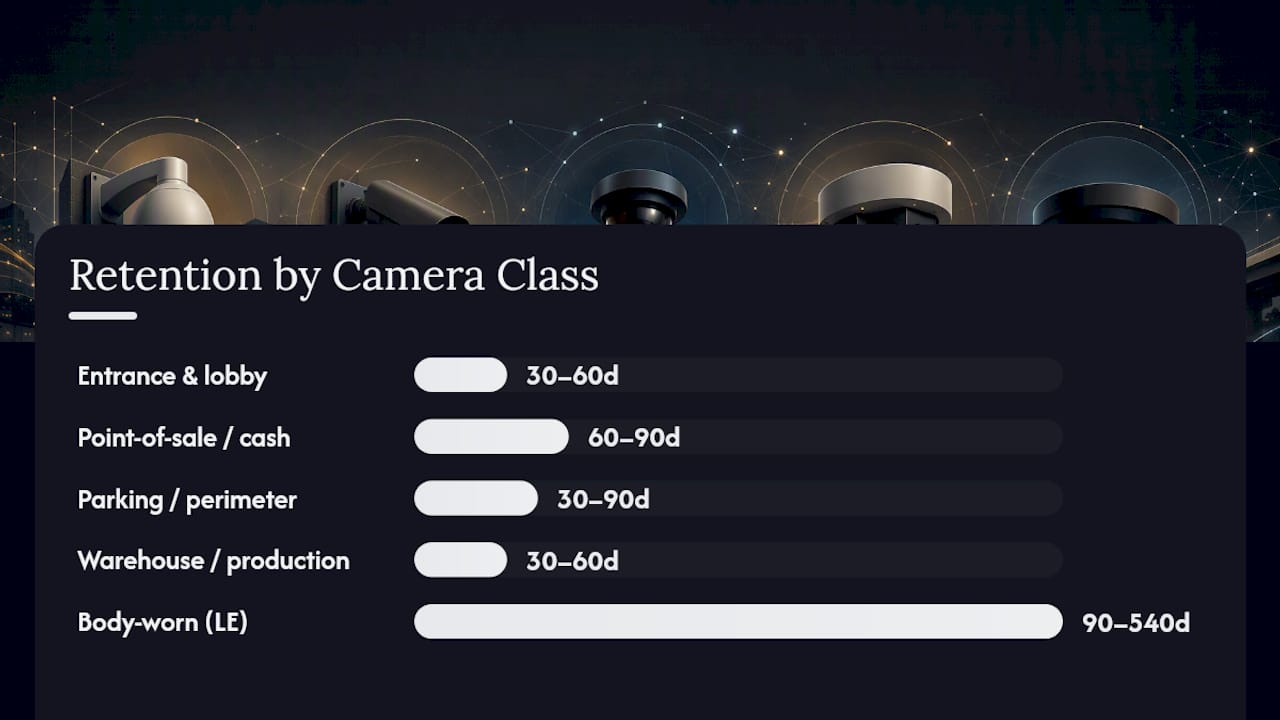
Retention isn’t one number. It changes based on what the camera watches and what could go wrong there. A lobby camera and a cash-handling camera carry different risk profiles, and your retention schedule should reflect that instead of applying one blanket rule across every lens on the property.
A workable set of defaults looks like this:
- Entrance and lobby cameras: 30 to 60 days, since most slip-and-fall or trespass claims surface within that window.
- Point-of-sale and cash-handling cameras: 60 to 90 days minimum, tied to chargeback and internal-theft investigation timelines.
- Parking lots and exterior perimeter: 30 to 90 days, longer where vehicle break-ins or assault claims are common.
- Warehouse and production floor: 30 to 60 days, extended for zones with high-value inventory or workers’ compensation exposure.
- Body-worn cameras (law enforcement): commonly 90 days to 18 months for standard interactions, based on TCOLE model policy guidance and comparable state frameworks.
- Public-facing CCTV in regulated industries: governed by sector floors, not internal preference.
Banking is the clearest example of a statutory floor. Federally regulated institutions typically retain surveillance recordings well beyond 90 days to satisfy FDIC examination expectations, and cannabis dispensaries and gaming floors face similarly strict state-mandated minimums, often 90 days to a year, because licensing depends on it. Insurance advisers increasingly push clients toward the higher end of these ranges anyway. Premises-liability claims and late-filed complaints routinely surface after the 30-day mark, which is why risk consultants recommend 60 to 90 days as the safer professional standard rather than treating 30 days as sufficient.
When an incident occurs, whether it’s a reported theft, an injury, or a formal complaint, the affected footage needs to be flagged and pulled out of the normal deletion cycle immediately, with a written note of who flagged it, when, and why.
Why U.S. Video Retention Laws Vary by State and Sector
Security professionals often ask if there’s a universal video retention law in the United States. There isn’t. No federal statute sets a uniform retention period for private-business video, which means your obligations come from a patchwork of federal sector rules, state statutes, and local ordinances that stack on top of each other depending on your industry and address.
A few concrete examples show how this plays out:
- Federal sector rules: Banks regulated by the FDIC face retention expectations tied to examination and fraud-investigation cycles, not a fixed calendar number.
- State guidance: Colorado’s Archives-issued framework sets minimum retention categories for body-worn footage, commonly 30 days for non-evidentiary recordings, and multi-year or permanent retention once footage documents a serious crime or use-of-force incident.
- Municipal practice: NYPD’s body-worn camera program follows internal retention practices that keep most footage well beyond 90 days, longer when it’s tied to an open investigation or a civilian complaint.
- Model policy frameworks: TCOLE’s published model policies give Texas agencies a template that many other states’ departments adapt directly.
- Local ordinances: A growing number of cities require registered commercial camera systems to retain footage for a minimum period, sometimes 30 days, as a condition of the registration itself.
Law enforcement footage carries an added wrinkle: public-records law. Once video becomes responsive to a records request or discoverable in litigation, retention gets frozen for that specific footage even if the general schedule would have deleted it already. That’s a separate obligation from your everyday retention table, and it needs its own trigger in your workflow.
Building a Legally Defensible Video Retention Policy
A retention policy that only lives in someone’s head isn’t a policy, it’s a liability. Auditors, insurers, and opposing counsel all want the same thing: a written document showing you thought this through before an incident happened, not after.
Structure the document around these sections:
- Purpose and scope – what the policy covers and why (safety, loss prevention, compliance).
- Camera classification – group cameras by risk tier (entrance, POS, exterior, sensitive areas).
- Retention table – default days per class, plus the rule for extending it.
- Evidence handling – chain-of-custody steps once footage is pulled for an incident.
- Access and export rules – who can view, download, or share recordings, and how that’s logged.
- Redaction rules – when and how footage gets blurred or trimmed before wider use.
- Audit and review cadence – how often the policy itself gets revisited, typically annually.
Assign real names to real roles, not just job titles floating in a document nobody reads. You need a data owner who decides what gets recorded, a retention owner who manages the schedule and the deletion jobs, a legal counsel contact who can authorize a hold, a records custodian who handles export requests, and designated incident flaggers, usually shift supervisors or security managers, who can pause deletion the moment something happens.
The legal-hold workflow is where most organizations fall apart in practice. A preservation duty attaches the moment litigation becomes reasonably anticipated, not the moment a lawsuit is filed. That means your incident flaggers need clear triggers: a written complaint, a visible injury, a police report, a termination dispute, or a letter from an attorney. Once triggered, the hold should be surgical, locking only the specific cameras and time ranges relevant to the incident, logged with a hold ID, a reason, and a release condition, so it doesn’t quietly become permanent retention for footage nobody actually needs anymore.
Pro Tip: Run a tabletop legal-hold drill twice a year. Pick a fake incident, walk your team through flagging it, applying the hold, and releasing it, then time how long it takes. If it takes more than a day to lock down footage, your real incident response will be too slow.
Storage Architecture That Actually Matches Your Retention Policy
Writing a 90-day retention policy means nothing if your recorder is set to overwrite footage every 30 days on a disk loop. That’s the single most common gap between policy and reality: the paperwork says one thing, the hardware does another.
Modern video management systems let you configure policy-driven deletion instead of relying on simple disk-loop overwrite, and most VMS platforms support retention parameters through ONVIF profiles or a vendor-specific setting like MaxRetentionTime. Test that setting after configuring it. Don’t assume it’s working; pull a clip from day 89 and confirm it’s still there.
Two technical choices matter more than any other for stretching your budget: motion or analytics-triggered recording instead of continuous capture, and efficient codecs like H.265 instead of older H.264 streams. Vendors like Cisco Meraki recommend combining motion-based retention with smart codecs and tiered cloud archive specifically because continuous recording at 90 days multiplies your storage footprint fast.
That multiplication is real and worth planning for. Extending retention from 30 to 90 days typically triples storage needs for continuous recording, while analytics-triggered recording can cut that increase substantially since idle hallways and empty parking lots stop consuming disk space.
| Camera setup | 30-day continuous | 90-day continuous | 90-day motion-triggered |
|---|---|---|---|
| small business | Baseline | About 3x baseline | Roughly 1x to slightly above baseline |
| warehouse | Baseline | About 3x baseline | Roughly 1.2x to 1.8x baseline |
Cloud archive tiers, similar to what’s covered in guidance on outdoor cameras with cloud storage, give you a way to push older footage to cheaper storage without deleting it outright, which is often the cleanest path to hitting a 90-day target without buying more local disk than you need.
Chain of Custody, Access Control, and Disclosure Rules
Footage that isn’t handled correctly can become useless in court even when it was recorded correctly. Access control and documentation are what turn a video file into admissible evidence.
Keep access on a least-privilege basis: only people with a documented operational reason can view or export footage, and every export requires a signed or logged request tied to a specific reason, incident number, and requester. That log needs to be immutable, meaning nobody, including administrators, can quietly edit it after the fact.
- Require a signed export request before any clip leaves the system.
- Log every view, export, and deletion attempt with a timestamp and user ID.
- Create redacted derivatives for training or public release, and keep the raw original locked down unless a legal hold or statute requires longer preservation.
- Route subpoenas, FOIA requests, and insurance demands through legal counsel before releasing anything, documenting exactly what was disclosed and when.
One detail security teams miss constantly: a redacted copy for training purposes is not a substitute for preserving the original once a hold applies. Delete the wrong version and you’ve destroyed evidence while thinking you were just cleaning up a training library.
A Quick-Reference Retention Checklist
Use this as a starting table when drafting or auditing your own policy, then adjust the ranges to your sector’s actual floor.
| Camera class | Default retention | Extension trigger |
|---|---|---|
| Lobby/entrance | 30–60 days | Complaint or injury report |
| POS/cash handling | 60–90 days | Chargeback or theft investigation |
| Exterior/parking | 30–90 days | Vehicle incident or assault claim |
| Body-worn (law enforcement) | 90 days–18 months | Use of force, arrest, or open case |
Before your next audit or renewal, confirm you have: a named legal-hold contact, a scheduled annual policy review, a tested export-logging process, and a working redaction capability. When an insurer or auditor asks why you chose your specific window, point to the sector minimums that apply to you and the operational guidance on how CCTV footage supports incident investigations rather than a number pulled out of thin air.
Why Retention Planning Belongs in Procurement, Not Just Policy
Retention is fundamentally an insurance decision disguised as a technical setting. Every day of footage you keep is a day you might need to defend a claim, and every day you don’t keep is a day you can’t get back once it’s gone.
We think about system sizing the same way: matching NVR capacity and cloud tiers to the retention window a business actually needs, not whatever the default happened to ship with. Teams handling sensitive footage, healthcare offices, legal practices, cannabis retailers, benefit from a documented redaction workflow as much as they benefit from more disk space. If you’re sizing a system around a specific retention target, that’s a conversation worth having before you buy hardware, not after a claim shows your 30-day loop wasn’t enough.
— Safes and Security Solutions
Storage That Matches Your Retention Policy, Not the Other Way Around
Most businesses buy a camera system first and discover their retention gap later, usually during an insurance review or a lawsuit. Some providers build the storage side first: professional-grade NVRs and camera systems sized to hold 90 days or more of footage.

If your current setup can’t comfortably hit the retention window your industry expects, that’s a hardware conversation, not just a policy rewrite. Our security camera buying guide walks through matching camera class to storage capacity. For facilities storing sensitive footage alongside physical assets, pairing your surveillance plan with a rated burglary and fire safe covers the paper and drive backups your video system can’t protect on its own. Review the product specs, then reach out for sizing help if your retention target doesn’t match what your current recorder can hold.
Sources
- How long to keep business documents · U.S. Chamber
- Security Camera and Recording Retention Policy · Princeton University
- Colorado body-worn camera retention guidance · Colorado State Archives
- Guide to legal holds · Everlaw
FAQ
What Is the 7-Year Retention Policy People Mention?
The 7-year figure usually comes from financial and tax record-keeping rules, not video. Surveillance footage almost never needs 7-year retention unless it’s tied to a specific ongoing legal matter or an industry mandate that says otherwise.
Can I Get CCTV Footage from Two Years Ago?
Almost certainly not, unless that footage was placed under a legal hold or exported before the standard retention window expired. Most systems following a 30 to 90 day policy have already overwritten footage that old.
Does the U.S. Have Federal Data Retention Laws for Video?
No single federal law sets a universal video retention period for private businesses; obligations come instead from sector regulators like the FDIC, state statutes, and local ordinances that vary by industry and location.
What Are the Federal Record-Retention Requirements That Apply to Video?
Federal requirements apply mainly through sector regulation, such as banking oversight from the FDIC, rather than a general video statute. Businesses outside regulated sectors set their own policy based on state law and documented risk assessment.
What Triggers a Legal Hold on Security Footage?
A legal hold triggers the moment litigation becomes reasonably anticipated, which can include a written complaint, a visible injury, an attorney letter, or a police report. Once triggered, that preservation duty overrides your normal deletion schedule for the affected footage.