

The Role of Point-of-Sale Security for SMBs
TL;DR:
- Effective point-of-sale security combines layered controls such as encryption, tokenization, access management, and network segmentation to protect customer payment data. Human behavior, operational practices, and network design significantly influence security effectiveness, requiring ongoing management and discipline. Proper physical security and vigilant staff practices help prevent theft and tampering, reducing overall vulnerability and business risks.
Point-of-sale (POS) security is defined as the integrated set of controls that protect customer payment data and prevent fraud at every transaction point. For small and medium-sized business owners, this means far more than installing a card reader and hoping for the best. PCI DSS compliance sets the baseline, but it leaves real gaps that attackers exploit through insider threats, physical tampering, and network intrusion. The role of point-of-sale security is to close those gaps through layered defenses: encryption, tokenization, access control, and network segmentation working together as one system.
What are the key components of POS security architecture?
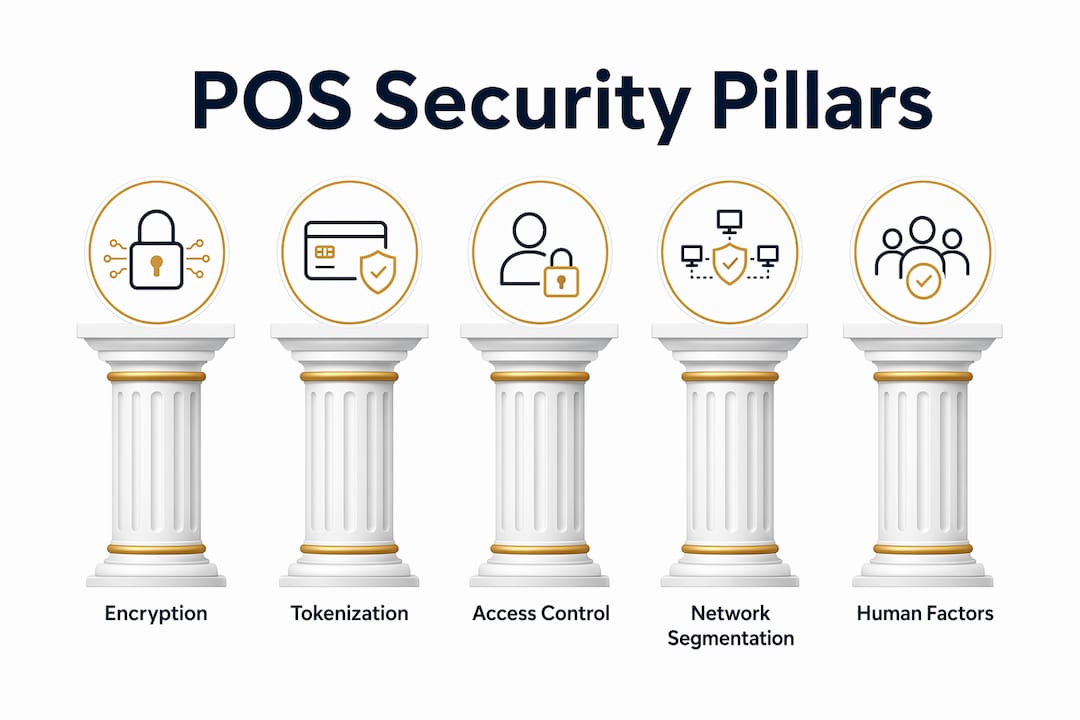
POS security architecture is a unified system where encryption, tokenization, and access controls work together to reduce both the value of stolen data and the probability of a successful attack. Each layer reinforces the others. Remove one, and the whole structure weakens.

Encryption and Point-to-Point Encryption (P2PE) protect card data from the moment a customer swipes or taps. P2PE encrypts card data at entry and keeps it encrypted all the way to the payment processor. This means even if an attacker intercepts the data in transit, they get nothing usable. It also dramatically simplifies your PCI compliance scope.
Tokenization replaces sensitive card data with a random token after the initial transaction. That token has no value outside your payment system. If your storage is breached, attackers find tokens, not card numbers.
Access controls determine who can touch your POS system and what they can do with it. The three principles to follow are:
- Unique user authentication: Every employee gets their own login. No shared accounts.
- Multi-factor authentication (MFA): A second verification step, such as a code or biometric scan, blocks unauthorized access even when passwords leak.
- Least privilege: Each user gets access only to what their job requires. A cashier does not need access to refund reports or system settings.
Network segmentation isolates your POS systems from the rest of your business network. This limits the attack surface and contains damage if another part of your network is compromised.
Pro Tip: Treat these four pillars as a package, not a menu. Businesses that implement encryption without access controls, or tokenization without network segmentation, still carry significant exposure.
How do human factors affect POS security effectiveness?
Human behavior creates as many vulnerabilities as technical flaws. Shared PINs or passwords written near terminals are among the most common and most preventable POS security failures. A sticky note with a password taped to a register is not a minor oversight. It is an open door.
The fix starts with individual accountability. Every employee who touches a POS terminal needs a unique credential tied to their identity. Passwordless verification methods like biometrics or badge-based authentication solve the shared-device problem without slowing down high-traffic workflows. A cashier can tap a badge and be authenticated in under a second. You can read more about how these technologies work in this biometric access guide from Safes and Security Solutions.
Operational practices matter just as much as technology. Here is a practical sequence for building human-layer security into your daily operations:
- Train staff at onboarding. Cover password hygiene, how to spot skimming devices, and what to do if something looks wrong.
- Run quarterly refreshers. Threats change. Training needs to keep pace.
- Inspect hardware regularly. Check terminals for physical tampering, unfamiliar attachments, or loose components before each shift.
- Enforce role-based access. Audit who has access to what at least once a month. Remove permissions when roles change.
- Document and manage changes. Any software update, hardware swap, or configuration change should go through a formal approval process.
Pro Tip: Physical inspection of POS terminals takes less than two minutes per device. Build it into your opening checklist the same way you check cash drawer counts.
What network practices help secure your POS environment?
Network design is where many small and medium-sized businesses leave the most risk on the table. Shared Wi-Fi for POS and administrative systems creates lateral attack paths that let an intruder move from a compromised laptop straight into your payment systems. Fixing this does not require expensive infrastructure.
The most effective step is placing POS systems on a dedicated VLAN with strict firewall rules. A VLAN (Virtual Local Area Network) is a logical separation within your existing network. It keeps POS traffic isolated without requiring separate physical hardware. Network segmentation can reduce the number of in-scope PCI systems from hundreds to fewer than 10. That reduction cuts both your audit burden and your exposure.
The table below compares two common network configurations for small and medium-sized businesses:
| Configuration | PCI scope | Attack surface | Recommended |
|---|---|---|---|
| Shared network (POS + admin + guest Wi-Fi) | High, many systems in scope | Large, lateral movement possible | No |
| Segmented VLAN for POS only | Low, few systems in scope | Small, contained to POS segment | Yes |
Beyond segmentation, keep your POS software and firmware updated. Vendors release patches for known vulnerabilities. Delaying updates leaves known attack vectors open. Pair updates with monitoring and logging so you can detect anomalies early. An alert on an unusual login at 2:00 AM is far cheaper than discovering a breach 258 days later.
Strong authentication at the network level adds another barrier. Require credentials before any device can connect to the POS VLAN, and log every connection attempt.
What are the business risks of weak POS security?
The financial cost of a POS breach is not a hypothetical. Retail data breaches cost an average of $3.48 million per incident. For a small or medium-sized business, that figure alone can be existential.
The timeline makes it worse. Breaches take an average of 258 days to identify and contain, and 66% of organizations report struggling with long-term recovery. That is nearly nine months of ongoing damage before the bleeding stops.
The financial hit is only part of the picture. 53% of retailers experience measurable reputational damage after a breach, often resulting in permanent customer loss. Customers who feel their payment data was mishandled rarely return. The impact on customer trust can outlast the technical recovery by years.
Additional consequences include:
- Compliance penalties: PCI DSS violations carry fines that scale with the severity and duration of non-compliance.
- Chargebacks: Fraudulent transactions triggered by stolen card data result in direct financial losses and processing fee increases.
- Ransomware disruptions: Attackers who gain POS network access often deploy ransomware, halting sales operations entirely.
- Hidden operational costs: Customer support volume spikes, staff time diverts to incident response, and legal fees accumulate fast.
The pattern is consistent. Weak POS security does not just create a data problem. It creates a business continuity problem.
What are best practices for ongoing POS security management?
Securing your POS environment is not a one-time project. Threats evolve, staff turns over, and systems change. Ongoing management keeps your defenses current. Building POS security into your physical security for SMEs framework gives it the operational weight it deserves.
A practical ongoing management checklist includes:
- Monthly access reviews: Confirm that only current employees have active credentials. Revoke access immediately when staff leave.
- Quarterly network audits: Verify that POS VLANs remain properly segmented and firewall rules have not drifted.
- Regular device integrity checks: Inspect terminals for tampering and confirm firmware versions match approved baselines.
- Incident response planning: Document a clear escalation path before an incident occurs. Know who to call, what to isolate, and how to notify affected customers.
- Vendor and partner controls: Third-party service providers with POS access should operate under least-privilege agreements with logged activity.
MFA for every user should be a non-negotiable part of your ongoing controls, not an optional add-on. Revisit your training program whenever you onboard new staff or change POS systems.
Key Takeaways
Effective POS security requires layered technical controls, disciplined human practices, and continuous management to protect customer data and prevent fraud.
| Point | Details |
|---|---|
| Architecture over add-ons | Encryption, tokenization, access controls, and segmentation must work as one integrated system. |
| Human factors are critical | Shared credentials and untrained staff create vulnerabilities that technology alone cannot fix. |
| Network segmentation saves money | Isolating POS on a dedicated VLAN reduces PCI scope and limits breach damage. |
| Breach costs are severe | Retail breaches average $3.48 million and take 258 days to contain, threatening business survival. |
| Ongoing management is required | Monthly access reviews, quarterly audits, and incident response planning keep defenses current. |
Why POS security is more than a compliance checkbox
Most small business owners I speak with treat PCI DSS as the finish line. Pass the audit, check the box, move on. That mindset is exactly what attackers count on.
PCI compliance is a minimum threshold. It tells you the floor, not the ceiling. The businesses that get breached are often technically compliant at the time of the incident. Compliance audits happen annually. Attacks happen daily.
What actually protects a business is the integration of technology and human behavior. You can deploy the best encryption available and still get compromised because a cashier shared their PIN with a new hire. The technical layer and the human layer have to reinforce each other. Neither works without the other.
The good news for small and medium-sized businesses is that strong POS security does not require an enterprise budget. Network segmentation, unique user credentials, P2PE-capable hardware, and a consistent training program are all achievable at modest cost. The investment is small compared to the $3.48 million average breach cost.
The businesses that get this right treat security as a living process, not a product they bought. They review access monthly, inspect hardware daily, and update their incident response plan whenever something changes. That discipline is what separates businesses that recover quickly from those that do not recover at all.
— Safes and Security Solutions
Physical security products that protect your POS setup
Protecting your POS environment extends beyond software and networks. The physical hardware at your transaction points, including terminals, cash drawers, and backup media, needs protection from theft, tampering, and unauthorized access.

Safes and Security Solutions offers a range of physical security products designed for business environments, from secure storage solutions for cash and sensitive hardware to surveillance systems that monitor transaction areas in real time. Pairing strong digital controls with physical protection gives your POS setup a complete defense. Businesses that secure their premises effectively reduce both the opportunity for physical tampering and the risk of hardware theft that could expose stored data.
FAQ
What is POS security?
POS security is the set of technical and operational controls that protect payment data and prevent fraud at transaction points. It includes encryption, tokenization, access management, and network segmentation working as an integrated system.
Why is PCI DSS compliance not enough on its own?
PCI DSS sets a minimum security baseline but does not address insider threats, physical tampering, or network misconfigurations. Businesses that rely on compliance alone leave exploitable gaps in their defenses.
How does network segmentation improve POS security?
Placing POS systems on a dedicated VLAN isolates them from other business traffic, limiting lateral movement by attackers and reducing the number of systems subject to PCI audit from potentially hundreds to fewer than 10.
What authentication method works best for shared POS devices?
Biometric or badge-based authentication gives each employee a unique, fast verification method without slowing down high-traffic workflows. It eliminates shared passwords and creates an auditable record of who accessed the system and when.
How long does it take to recover from a POS breach?
Breaches take an average of 258 days to identify and contain, and 66% of organizations report long-term recovery challenges. Early detection through monitoring and logging is the most effective way to shorten that timeline.
Recommended
- Physical Security for SMEs: Protecting Assets and Growth – Safes and Security Direct
- Upgrade business security: a systematic guide for SMBs – Safes and Security Direct
- Why Use a Cash Drop Safe: Essential for Retail Security – Safes and Security Direct
- Best Safes for Small Business Buyers – Safes and Security Direct