

Small Business CCTV Installation Guide for 2026
TL;DR:
- Small business CCTV installation involves strategically placing cameras to monitor property and deter theft. Most small businesses require 4 to 8 cameras focused on entrances, storage, and parking, with proper planning and legal compliance essential before equipment purchase.
Small business CCTV installation is the process of placing security cameras at strategic points to monitor your property, deter theft, and protect your assets. Most small businesses need between 4 and 8 cameras for effective coverage, with entrances, cash registers, storage areas, and parking lots as the priority zones. Getting this right means understanding camera types, cable management, mounting heights, and legal compliance before you buy a single piece of equipment. This guide walks you through every step of a successful business surveillance installation, from planning to final testing.
What tools and materials do you need for a small business CCTV installation guide?
The right preparation cuts your installation time in half. Gather every tool and material before you start, because stopping mid-install to find a drill bit wastes hours and creates mistakes.
Tools you need:
- Power drill with masonry and wood bits
- Screwdrivers (flathead and Phillips)
- Cable cutters and wire strippers
- Stud finder and level
- Ladder rated for your ceiling height
- Fish tape or cable rod for routing through walls
Materials and equipment:
- PoE (Power over Ethernet) cameras, which carry both power and data over a single cable
- Cat6 Ethernet cables for each camera run
- Mounting brackets appropriate for your wall type (concrete, drywall, or brick)
- A 4 to 8 channel NVR (Network Video Recorder) with built-in PoE ports
- Weatherproof conduit for any outdoor cable runs
- Cable clips, ties, and junction boxes
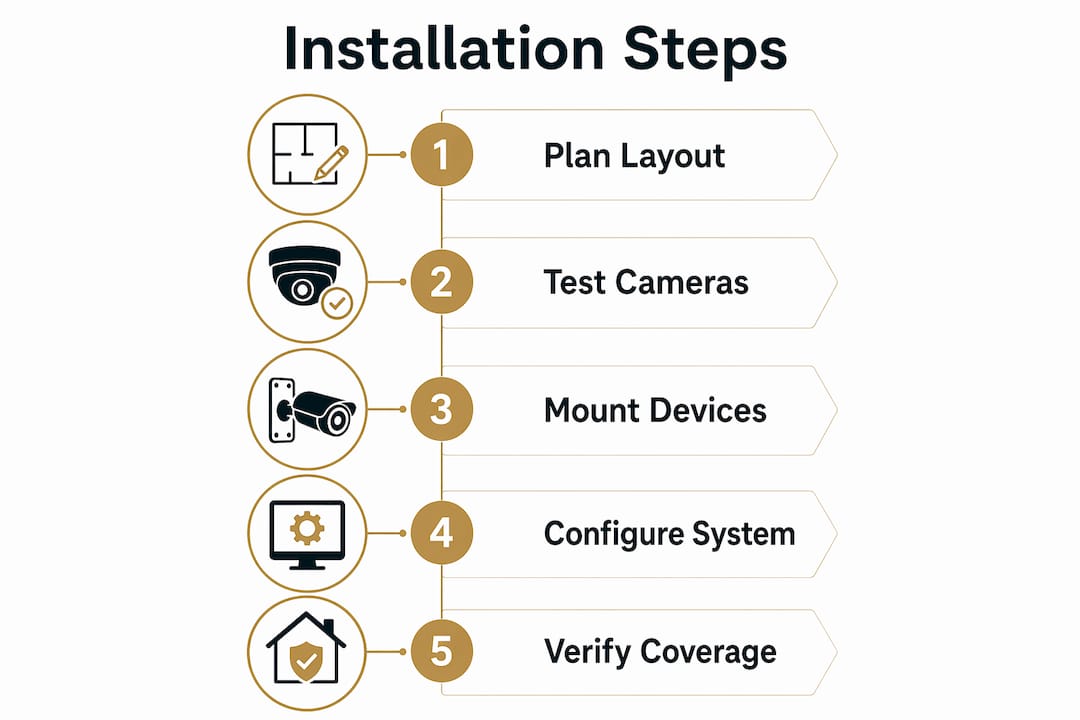
Before mounting anything, sketch a floor plan and mark your camera positions. Note where your power outlets and network switch are located. Identify the cable route from each camera to your NVR, and check for obstacles like fire doors, concrete beams, or electrical panels that force detours.
Pro Tip: Test every camera indoors before mounting it. Connect each unit to the NVR on a workbench, update the firmware, and confirm the image quality. Debugging a camera on a ladder is far harder than fixing it at desk height.

How do you plan camera placement and coverage for your business?
Camera placement determines whether your system produces usable evidence or just blurry footage. Start by identifying your highest-risk points.
Priority locations for every small business:
- Front and rear entrances and exits
- Cash registers and point-of-sale terminals
- Stock rooms and storage areas
- Server rooms or safes
- Parking areas and loading bays
- Any blind corners inside the sales floor
Camera counts vary by business type. A retail shop between 50 and 150 square meters typically needs 4 to 8 cameras. Larger light industrial units require more. Eight cameras is the widely accepted standard configuration for covering all critical zones in a typical small business.
Mounting height matters more than most owners realize. Dome cameras mounted between 8 and 12 feet high deliver the best balance of facial identification and vandalism resistance. Mount them higher and you deter tampering, but you lose the forensic detail needed to identify a face. Bullet cameras work better for exterior walls, aimed along the building perimeter. PTZ (pan-tilt-zoom) cameras suit large open areas like parking lots and are typically mounted at 18 to 25 feet.
For a strategic camera setup, consider lighting at every position. A camera pointed directly at a bright window will silhouette everyone in front of it. Use wide dynamic range (WDR) cameras in high-contrast lighting situations, and verify infrared (IR) performance for any location that goes dark at night.
| Location | Camera type | Mounting height |
|---|---|---|
| Indoor sales floor | Dome | 8–10 feet |
| Exterior entrance | Bullet | 9–12 feet |
| Parking lot | PTZ or bullet | 12–18 feet |
| Cash register | Dome (varifocal) | 8–10 feet |
| Storage room | Dome | 8–10 feet |
Camera types vary by location: dome cameras work best indoors for wide coverage, bullet cameras excel outdoors for range, and PTZ units cover large open areas. Matching the right camera to each zone is the single biggest factor in image quality.
What are the step-by-step instructions for installing CCTV in a small business?
Follow these steps in order. Skipping ahead, especially on cable routing, creates problems that are expensive to fix later.
-
Finalize your layout. Confirm camera positions on your floor plan. Mark cable routes on the walls with painter’s tape. Identify where the NVR will sit and confirm it has a power outlet and network access.
-
Mount the brackets. Use a stud finder to locate solid mounting points. For masonry walls, use a hammer drill and appropriate anchors. Hold a level against each bracket before tightening. A crooked mount means a crooked camera.
-
Run and secure your cables. Feed Cat6 cable from each camera position back to the NVR location. Use cable clips every 12 inches along walls. For outdoor runs, pull cable through weatherproof conduit. Professional installers separate power and data cables and use conduit to prevent electromagnetic interference and extend cable life.
-
Connect cameras to the NVR. PoE cameras use a single Ethernet cable for both power and data, which simplifies wiring significantly. Plug each cable into a labeled PoE port on the NVR or PoE switch.
-
Configure the system software. Set the date and time on the NVR first. Then configure motion detection zones for each camera, set recording schedules, and establish your retention period. A 2TB NVR hard drive stores 14 to 30 days of footage at 2–4MP resolution across 4 cameras. That range covers most insurance and legal requirements.
-
Test the full system before sealing. Check live view for every camera. Trigger motion detection and confirm alerts fire correctly. Test night vision by turning off the lights. Review a short playback clip to confirm recording is working.
Pro Tip: Cameras tend to settle slightly after installation, sometimes shifting 1 to 2 centimeters. Aim each camera slightly higher than your target zone during mounting. The final resting angle will land exactly where you need it.
What legal and compliance considerations apply to small business CCTV?
Legal compliance is not optional. Small business owners frequently overlook privacy signage requirements and their obligations around recorded footage, which can result in fines and reputational damage.
Key compliance requirements:
- Privacy signage: Post clearly visible signs at all entrances informing staff and customers that CCTV is in operation. Signs must state who operates the system and how to request footage.
- Data protection: In most jurisdictions, recorded footage is classified as personal data. Store it securely, limit access to authorized personnel, and delete it after your defined retention period.
- Subject Access Requests (SARs): Individuals have the right to request footage in which they appear. You must respond within the legally required timeframe, which varies by jurisdiction.
- Staff notification: Employees must be informed that CCTV is in use. Covert surveillance of staff carries strict legal restrictions in most states and countries.
- Jurisdiction differences: Laws governing video surveillance differ between US states, and between the US and other countries. Consult a legal professional or a certified security consultant before finalizing your system.
Pairing your surveillance system with a layered security plan that includes access control and alarm systems strengthens both your physical security and your legal standing. Cameras alone do not constitute a complete security posture.
Should you choose DIY or professional installation for your small business?
The right choice depends on your building type, your technical confidence, and how many cameras you need.
DIY installation advantages:
- Lower upfront cost, with no labor fees
- Full control over scheduling and equipment choices
- Suitable for simple single-floor layouts with accessible ceilings
Professional installation advantages:
- Concealed cabling inside walls and ceilings for a clean finish
- Warranty on labor and workmanship
- Expert knowledge of mounting heights, cable routing, and compliance
DIY installation suits simple layouts with accessible ceilings. Professional installation becomes the better choice in multi-story buildings, listed properties, or any site where cable routing through concrete or fire-rated walls is required. Typical labor costs for professional installation range from $500 to $1,500 depending on camera count and building complexity.
| Factor | DIY | Professional |
|---|---|---|
| Cost | Lower (equipment only) | Higher (equipment plus labor) |
| Cable finish | Surface-mounted | Concealed in walls |
| Expertise required | Moderate | None from owner |
| Warranty on install | None | Typically included |
| Best for | Simple layouts | Complex buildings |
Pro Tip: Whether you go DIY or hire a professional, complete your floor plan and camera coverage map before purchasing any equipment. Buying cameras before planning your layout is the most common and most expensive mistake in business surveillance installation.
For guidance on securing commercial premises effectively, a pre-purchase site assessment saves money and prevents rework.
Key Takeaways
A successful small business CCTV installation requires upfront planning, correct mounting heights, proper cable management, and legal compliance before a single camera goes live.
| Point | Details |
|---|---|
| Camera count | Most small businesses need 4–8 cameras covering entrances, registers, storage, and parking. |
| Mounting height | Mount dome cameras at 8–12 feet for the best balance of facial detail and vandalism resistance. |
| PoE simplifies wiring | PoE cameras use one cable for power and data, reducing installation complexity significantly. |
| Storage planning | A 2TB NVR provides 14–30 days of footage at 2–4MP for 4 cameras. |
| Legal compliance | Post privacy signage, define a retention policy, and understand Subject Access Request obligations before going live. |
What I’ve learned from watching small businesses get CCTV wrong
The most common mistake we see is owners buying cameras before they have a plan. They pick a four-camera kit because it looks affordable, mount everything in an afternoon, and then discover two cameras point at blank walls and one faces directly into a window. The footage is useless, and the system gives a false sense of security.
The second most common mistake is ignoring compliance entirely. Cameras go up, no signs go on the doors, and the owner has no idea what a Subject Access Request is. That is a liability waiting to happen, not a security asset.
The third mistake is buying a closed system with no room to grow. A retail shop that starts with four cameras often needs six within a year as the business expands or a new risk area appears. Buy an NVR with at least double the ports you need on day one.
At Safes and Security Solutions, we consistently tell owners: test everything before you seal the cables. Spend an afternoon with the system running on a bench. Confirm every camera, every alert, and every playback function works before a single screw goes into the wall. That one step eliminates the majority of post-installation problems we get called in to fix.
— Safes and Security Solutions
Professional CCTV systems for small businesses from Safes and Security Solutions
Safes and Security Solutions supplies professional-grade surveillance cameras and complete NVR systems built for small business environments.

Whether you are planning a four-camera setup for a single retail unit or an eight-camera system across a multi-room commercial property, the product range at Safes and Security Solutions covers PoE cameras, NVR kits, mounting hardware, and weatherproof cabling solutions. Every product listing includes full specifications so you can match equipment to your coverage plan before you buy. For owners who want expert guidance on CCTV installation options, the site also provides detailed setup resources and direct customer support to help you get the right system the first time.
FAQ
How many cameras does a small business need?
Most small businesses need between 4 and 8 cameras to cover all critical zones. Retail shops between 50 and 150 square meters typically fall in that range, with larger premises requiring more.
What height should CCTV cameras be mounted at?
Dome cameras should be mounted at 8 to 12 feet for the best combination of facial identification and vandalism resistance. Mounting higher reduces image detail and makes it harder to identify individuals.
Do I need signs if I install CCTV in my business?
Yes. Privacy signage is a legal requirement in most jurisdictions. Signs must be clearly visible at all entrances and inform people that CCTV is in operation and who operates the system.
What is the difference between PoE and traditional CCTV cameras?
PoE cameras use a single Cat6 Ethernet cable to carry both power and data, which simplifies installation and reduces the number of cables needed. Traditional analog cameras require separate power and coaxial video cables.
How long does a small business CCTV system retain footage?
A 2TB NVR hard drive stores 14 to 30 days of footage at 2–4MP resolution for a four-camera system. Retention length depends on resolution settings, the number of cameras, and whether motion-only or continuous recording is used.
Recommended
- DIY Home Surveillance Guide for Homeowners in 2026 – Safes and Security Direct
- Step by Step Home Surveillance Guide for Homeowners – Safes and Security Direct
- Security Camera Buying Guide for Home and Business – Safes and Security Direct
- How to Set Up Home Security Camera System 2026 – Safes and Security Direct