

Size Security Camera Storage: Home & Small Business Formula
For most homeowners and small businesses, the right answer is a hybrid setup: local recording to an NVR or SD card, plus cloud backup for critical clips. That combination gives you full-resolution footage on-site if the internet goes down, offsite copies if someone steals the recorder, and none of the monthly bandwidth strain of uploading every frame to the cloud. Pure cloud only makes sense for single cameras or highly regulated businesses that need centralized, audit-ready retention.
TL;DR:
- Systems with eight 4K cameras recording continuously for 30 days require roughly 10.37 TB of raw storage, favoring dedicated NVR hardware for large setups.
- For homes with up to four cameras, small NVRs or SD cards typically suffice, whereas small businesses with 8 to 32 cameras need RAID-enabled NVRs or hybrid solutions.
- Cloud storage is unsuitable if upload speed is below 10 Mbps or for large multi-camera systems, but it benefits multi-site operations with centralized retention policies.
- Always add 10 to 25 percent headroom to your storage calculations for RAID overhead, unexpected activity spikes, and future camera additions.
Table of Contents
- Types of Security Camera Storage Explained
- How to Calculate Security Camera Storage Needs
- Local vs. Cloud vs. Hybrid: Which Wins on What
- Ways to Cut Storage Costs Without Losing Footage
- Storage Setup Templates by Camera Count
- How Safes and Security Solutions Supports Your Setup
- An Editorial Take on Storage Planning
- Get Your Storage Sized Right the First Time
- Sources
- FAQ
Types of Security Camera Storage Explained
Every surveillance setup boils down to four storage methods, and knowing which one you’re dealing with changes everything else in this guide.
- SD card / on-camera storage. Footage saves directly to a memory card inside the camera. It’s cheap and simple, but capacity is limited (usually 32GB to 512GB) and a stolen camera means stolen evidence.
- NVR or DVR with local hard drives. A dedicated recorder pulls video from multiple cameras and stores it on internal drives. This is the standard for NVR for security cameras setups with 4 or more cameras, and it keeps footage under your physical control.
- Cloud storage. Video uploads to a remote server, typically through a subscription plan. You get automatic offsite backup and remote access, but you’re trusting a vendor with your footage and your upload bandwidth.
- Hybrid. Local recording handles the full-quality feed while the cloud holds event clips or a lower-bitrate backup stream. Most professionally installed systems built after 2020 lean this direction.
A single home camera watching a driveway can live happily on an SD card. A retail store with eight entry points and a two-year-old employee dispute pending? That needs an NVR with real retention math behind it, which is exactly what the next section covers.
How to Calculate Security Camera Storage Needs
The formula that governs every surveillance storage decision is straightforward once you see it written out: (cameras × bitrate in Mbps × 0.125 × seconds per day × retention days) ÷ 1024 = terabytes needed.
Break down the variables: bitrate is how many megabits per second each camera streams (higher resolution and frame rate push this up), 0.125 converts megabits to megabytes, and retention days is how long you legally or practically need to keep footage.
Here’s how that plays out in real numbers:
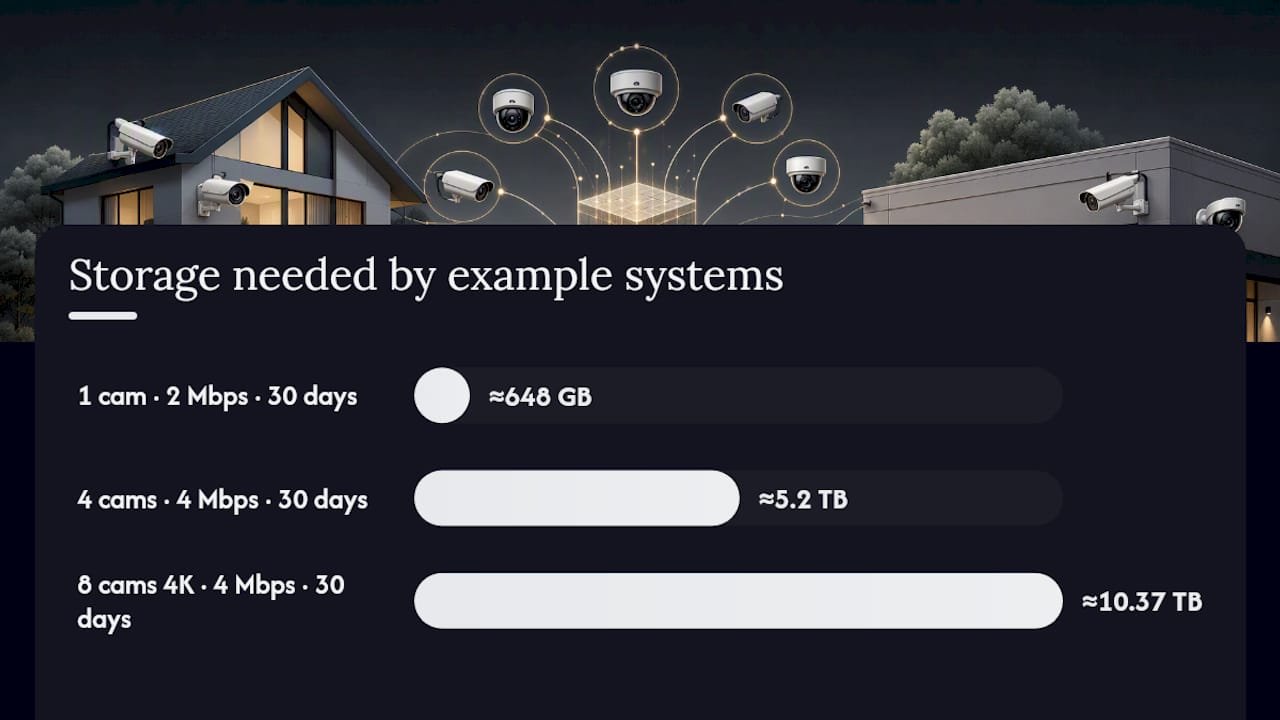
- One camera, 2 Mbps, 30-day retention: roughly 648 GB. A single 1TB drive covers this with room to spare, and depending on scene activity, a lower-traffic room could stretch a 1TB drive across several weeks instead of one month.
- Four cameras, 4 Mbps each, 30 days: around 5.2 TB raw. This is where a bare 128GB SD card becomes almost useless. On heavy multi-camera systems, 128GB might hold less than a day of footage.
- Eight 4K cameras at 4 Mbps each, 24/7 recording, 30 days: approximately 10.37 TB raw, according to the sizing calculator most installers reference.
Statistic Callout: An 8-camera 4K system recording continuously for 30 days needs roughly 10.37 TB of raw storage, before RAID overhead. That number alone explains why serious multi-camera setups need dedicated NVR hardware, not a consumer hard drive pulled from a desktop.
Codec choice moves this number significantly. H.265 typically cuts file size by 40 to 50 percent compared to older H.264 encoding at the same visual quality, and enabling variable bitrate can nearly double your retention window without buying another drive, though the real savings depend on how much motion your cameras actually see. Switching from continuous recording to motion-triggered capture cuts storage further. And whatever raw number you calculate, add 10 to 25 percent headroom for RAID, formatting overhead, and unexpected spikes in activity, a buffer that FortSense’s own calculator builds in by default.
Local vs. Cloud vs. Hybrid: Which Wins on What
No single storage method wins across every category that matters. Here’s how the trade-offs actually shake out.
- Privacy and control: Local storage keeps footage entirely on your property, under your access rules. Cloud storage hands that control to a vendor, so encryption in transit and at rest isn’t optional.
- Cost: Local hardware is a one-time purchase, often $200 to $800 for a mid-size NVR system, but drives eventually fail and need replacing. Cloud plans run as a recurring monthly fee per camera that never stops.
- Bandwidth: Uploading one 4K stream continuously can eat most residential upload bandwidth. Try that with eight cameras and you’ll saturate a typical home connection, since most residential plans favor download speed over upload, making full-cloud recording impractical for anything beyond a couple of cameras.
- Reliability: Hard drives fail. Internet connections drop. A hybrid setup means one failure point doesn’t wipe out your footage entirely.
- Compliance: Businesses in regulated industries, healthcare offices, pharmacies, legal practices, often need documented retention windows and audit trails that cloud VMS platforms handle more cleanly than a standalone NVR.
Pro Tip: If your upload speed is under 10 Mbps, don’t even try full cloud recording for more than one or two cameras. Record locally at full quality and let the cloud handle short event clips instead.
Cloud earns its keep in multi-site operations where centralizing footage and retention policies across locations saves more hassle than the subscription costs. For a single-site home or small shop, that convenience rarely outweighs the monthly bill.
Ways to Cut Storage Costs Without Losing Footage
A few adjustments can shrink your storage bill dramatically before you ever touch a bigger drive.
- Switch to H.265 or H.265+. Same footage quality, often half the file size compared to H.264.
- Use motion-only recording. This typically reduces storage needs by 40 to 80 percent compared to continuous recording, depending on how much foot traffic the scene sees.
- Run dual-stream setups. Record a full-quality stream locally and a lower-bitrate substream for remote viewing or cloud upload.
- Buy surveillance-rated drives. WD Purple, Seagate SkyHawk, and Toshiba S300 drives are built for 24/7 write cycles; a desktop drive dropped into an NVR typically fails much sooner under that workload.
Statistic Callout: Cloud subscriptions commonly run in a wide range per camera per month depending on resolution and retention length. Run the math on a 4 to 8 camera system over three years and local hardware usually pays for itself well before the subscription would have cost the same.
Storage Setup Templates by Camera Count
Match your camera count to one of these configurations and you’ll skip most of the trial and error.
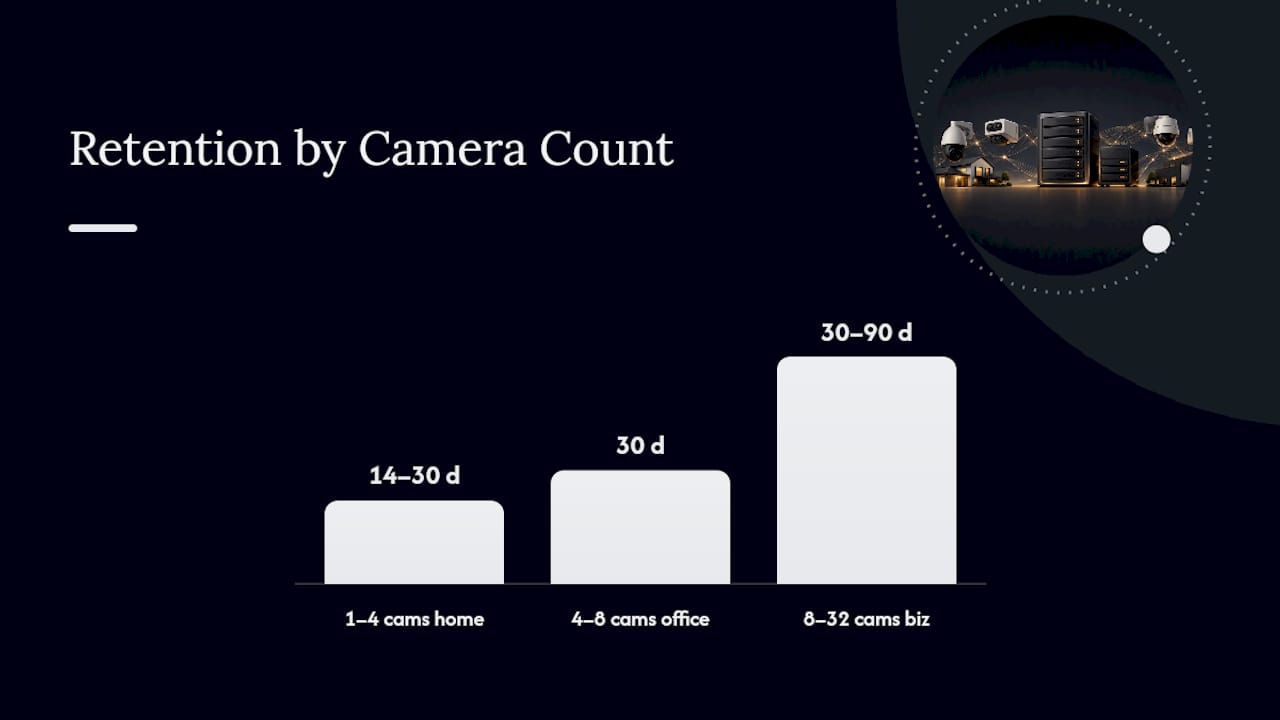
- 1 to 4 cameras, home use. An SD card or small 4 to 8 channel NVR handles this fine. Aim for 14 to 30 days of retention, and expect to spend somewhere in the low hundreds of dollars for a complete kit.
- 4 to 8 cameras, home or small office. Step up to a small NVR or a hybrid system pairing local recording with cloud clip backup. Budget for 30 days of retention and size your drive using the formula above, then round up to the next common drive size (2TB, 4TB, or 6TB).
- 8 to 32 cameras, small business. This is NVR-with-RAID territory, or a hybrid VMS if you’re managing multiple locations. Retention windows of 30 to 90 days are typical for retail and offices, and at this scale it’s worth a proper design review rather than eyeballing the math.
Before buying anything, check four things: the codec the cameras support (H.265 preferred), how many drive bays the NVR has for future expansion, whether your PoE switch has enough ports and power budget for every camera, and whether the system lets you add cameras later without replacing the recorder.
Pro Tip: Buy one more drive bay than you think you need. Camera counts almost always grow after the first break-in or the first insurance claim, never before.
How Safes and Security Solutions Supports Your Setup
Sizing storage on paper is one thing. Putting hardware on a wall that actually holds up is another, and that’s where a properly specified NVR system earns its price.
- Systems like the Lorex 4K NVR with 8TB storage support up to 32 cameras, which covers most of the small-business templates above without a second recorder.
- Product specification pages list drive capacity and camera limits upfront, so you can run the sizing formula against real hardware before buying.
- For setups beyond a straightforward 4 to 8 camera home install, reach out for a design review rather than guessing at drive size.
An Editorial Take on Storage Planning
The mistake we see most often isn’t undersizing storage. It’s buying a recorder with zero room to grow, then discovering six months later that adding four cameras means replacing the whole box instead of just swapping a drive. Our rule of thumb: hybrid for most homes and businesses, local-only if privacy is the priority and camera count stays low. Re-run your storage math every time you add a camera or your retention needs change; last year’s numbers rarely hold.
— Safes and Security Solutions
Get Your Storage Sized Right the First Time
Guessing at drive capacity leads to one of two outcomes: paying for storage you never use, or running out of retention right when you need footage most. Safes and Security Solutions carries NVR systems built with real headroom, like the 32-camera capable Lorex 4K NVR system with 8TB of storage, so your recorder can grow alongside your camera count instead of forcing a replacement in a year.

If your footage protects more than just a driveway, valuables, cash, documents, or firearms deserve the same planning. Pair your camera system with a fire-resistant option like the Gardall matte finish gun safe for physical asset protection that works alongside your surveillance setup, not instead of it. Browse the current lineup of NVR systems and safes, or contact the team directly for a storage design review before you commit to hardware.
Sources
Run your own numbers before buying: the UPSCalc storage calculator and FortSense’s retention calculator both handle the bitrate math for you. For compliance-heavy businesses, Camcloud is worth a look for centralized cloud retention. Beyond video, Talkroute’s guide to call recording storage covers similar retention principles for other business records.
- Upscalc
- CCTV Storage Calculator for 30-Day NVR Retention | FortSense
- Security Camera Storage: How Much Hard Drive Space Do You Need? | GW Security
- Cloud Video Surveillance & Monitoring for Security Cameras | Camcloud
FAQ
How Do I Store Security Camera Footage?
Footage stores through one of four methods: an SD card inside the camera, a local NVR or DVR with internal hard drives, a cloud subscription service, or a hybrid combining local and cloud. Most homes and small businesses do best with a local NVR for full-quality footage plus cloud backup for key clips.
How Long Does a 128GB SD Card Last in a Security Camera?
It depends heavily on bitrate and whether the camera records continuously or only on motion. A single low-bitrate camera might stretch 128GB across a week or two, but a high-resolution camera recording 24/7 can fill that same card in under a day.
How Long Does 1TB of Storage Last for Security Cameras?
A single camera at a modest bitrate can run for several weeks on 1TB. But an 8-camera 4K system recording continuously can burn through roughly 10.37 TB in just 30 days, which means 1TB might not even cover a full day on a larger multi-camera setup.
Do Security Cameras Store Footage Forever?
No. Storage is finite, so once a drive or SD card fills up, most systems overwrite the oldest footage automatically unless you manually archive it. Retention length depends entirely on your storage capacity, bitrate, and whether recording is continuous or motion-triggered.
Is Cloud Storage or Local Storage Better for Security Cameras?
Neither wins outright. Local storage gives you more privacy and no ongoing bill but no offsite backup, while cloud storage adds automatic backup and remote access at the cost of a recurring subscription and real bandwidth demands, which is why hybrid setups have become the practical middle ground for most homeowners and small businesses.