

Security Installers: Treat the PoE Distance Limit as 80–90m, Not 100m
The PoE distance limit is 100 meters (328 ft) end to end, set by the IEEE 802.3 Ethernet standard. That number covers data signaling, not power delivery. Voltage drop across the copper often makes high-power PoE unreliable well before you hit 100 meters, especially with 802.3bt devices, thin cable, or cheap conductors.
TL;DR:
- Copper cable quality and gauge significantly affect PoE performance, with solid copper and thicker gauges providing better voltage retention over long distances.
- Using Cat6 or Cat6A cables extends practical PoE range for higher power standards and is recommended for future upgrades or high-draw devices.
- Voltage drop caused by resistance is the main reason PoE devices often fail beyond 80 to 90 meters, especially under high load or in hot environments.
- Extending PoE over more than 100 meters typically requires extenders, fiber with media converters, or midspan injectors to maintain reliable power and data transmission.
- Testing voltage at the device under full load helps diagnose potential issues related to long-distance PoE cabling before replacing hardware.
Table of Contents
- What the PoE Cable Length Limit Actually Covers
- Practical PoE Range by Standard and Cable Type
- What Actually Shortens Your Usable PoE Range
- How to Extend PoE Beyond 100 Meters
- Troubleshooting a PoE Device That Won’t Power On at Long Range
- Installer Rules of Thumb Worth Following
- Get the Right Hardware for a PoE Install That Actually Holds Up
- Sources
- FAQ
What the PoE Cable Length Limit Actually Covers
The 100-meter figure comes from the Ethernet channel spec, which measures the entire path from switch port to device, including patch cords, punch-down panels, and the horizontal run. IEEE 802.3 sets that ceiling to preserve data signal integrity over twisted-pair copper, not to guarantee power delivery.
That is the distinction most installers miss. The channel limit is a signaling rule. Power delivery is an electrical problem governed by resistance, and resistance climbs with distance regardless of what the data spec allows. A camera can sit at 95 meters, well inside the Ethernet channel, and still brown out because the copper could not carry enough current at a usable voltage.
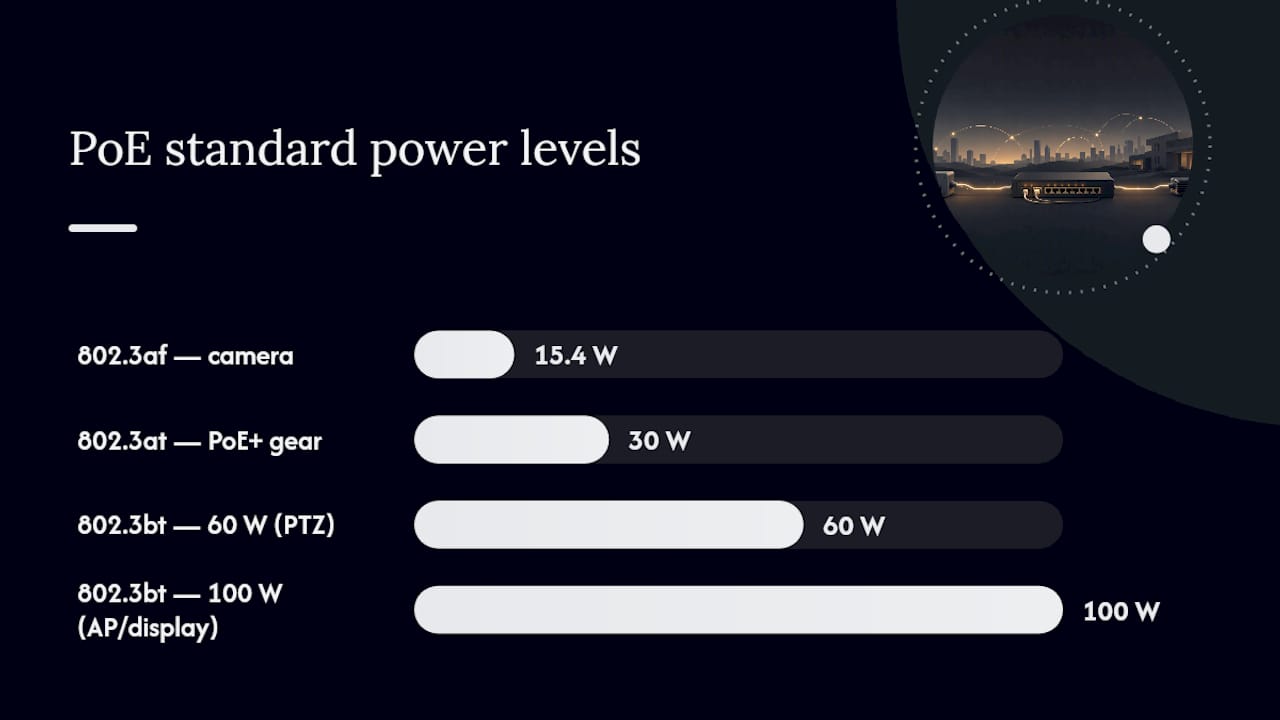
Three PoE standards matter here. 802.3af (PoE) delivers up to 15.4 watts at the source. 802.3at (PoE+) pushes that to 30 watts. 802.3bt (PoE++) scales to 60 or 100 watts depending on type, enough for PTZ cameras, access points with multiple radios, and even some flat-panel displays.
Practical PoE Range by Standard and Cable Type
Real-world PoE cable length depends on how much power the device pulls and what gauge copper is carrying it. Higher wattage means more current, and more current means more voltage lost to resistance over distance. This is why a low-power sensor and a heated PTZ camera behave very differently on the same 100-meter run.
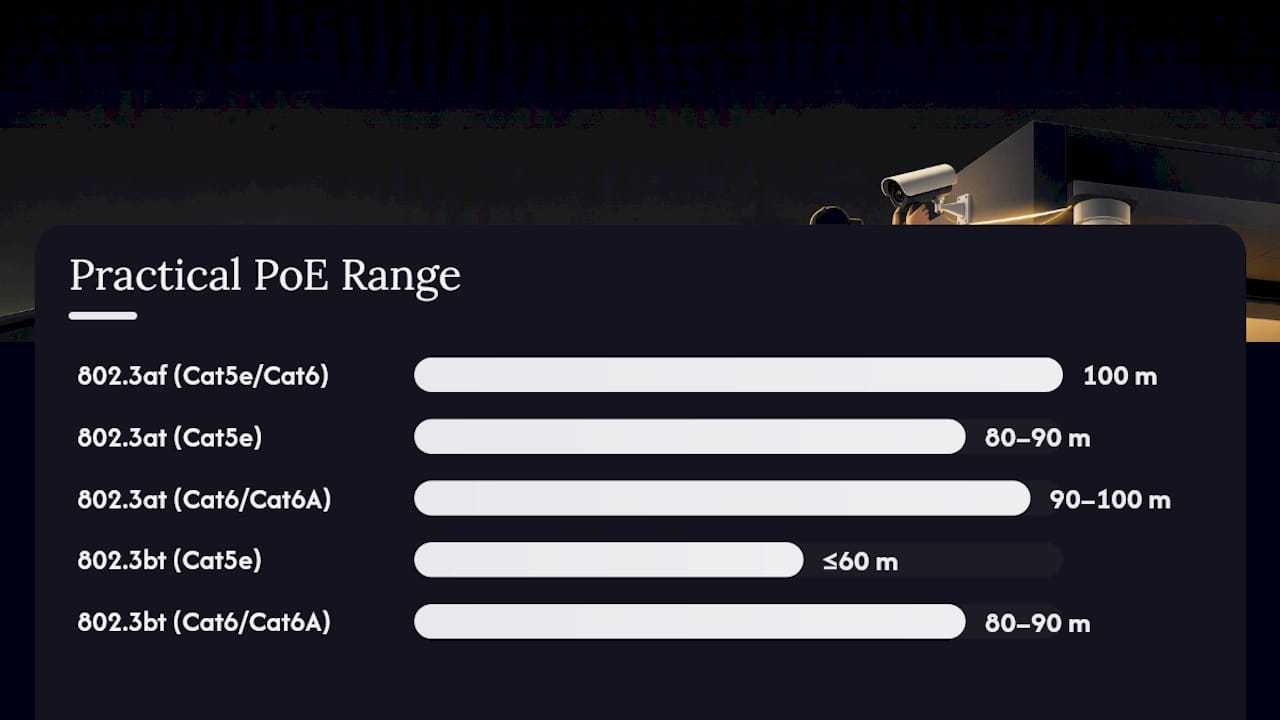
Cat5e, built on 24 AWG conductors, handles 802.3af comfortably to the full 100 meters. Push it to 802.3at and you start seeing voltage sag past 80 to 90 meters on lower-quality cable. Cat6 and Cat6A use thicker conductors and tighter twist specs, which cuts resistance and keeps higher-power PoE stable closer to the full channel length.
| PoE Standard | Max Power at Source | Cat5e Practical Range | Cat6/Cat6A Practical Range |
|---|---|---|---|
| 802.3af (PoE) | 15.4W | Full 100m | Full 100m |
| 802.3at (PoE+) | 30W | 80–90m | 90–100m |
| 802.3bt Type 3/4 | 60–100W | Not recommended past 60m | 80–90m |
Solid conductors outperform stranded cable on long runs because they carry lower DC resistance, and copper-clad aluminum should be avoided entirely for PoE voltage drop reasons. For anything running a high-draw device, budget your design to 80 to 90 percent of the calculated practical limit rather than the theoretical maximum.
What Actually Shortens Your Usable PoE Range
Voltage drop is the mechanism behind almost every “it worked on the bench but not in the field” PoE failure. As current travels through copper, resistance eats into the voltage, and the device on the far end receives less than the switch is sending. High-power PDs like PTZ cameras with heaters draw more current, which means they lose more voltage over the same distance than a basic sensor would.
A handful of factors compound that loss:
- Cable quality: copper-clad aluminum has notably higher resistance than solid copper, which is why manufacturers advise against it for PoE runs.
- Wire gauge: 24 AWG loses more voltage per foot than 23 AWG; thinner is always worse for power delivery.
- Connection count: every patch panel, coupler, or jumper adds resistance and a potential failure point.
- Ambient temperature: heat raises copper resistance, so an attic or rooftop run performs worse than the same cable in a climate-controlled space.
- Bundling: cables bundled tightly with dozens of others generate heat collectively, which compounds the temperature problem.
Pro Tip: Test voltage at the device under full load, not idle. A camera’s IR illuminators or an outdoor unit’s heater can double its power draw compared to daytime readings, and that’s exactly when marginal cabling fails.
How to Extend PoE Beyond 100 Meters
Three methods solve the same problem in different ways, and picking the wrong one usually means overpaying or overcomplicating a simple install.
PoE extenders regenerate both the data signal and power partway through the run, letting you add another segment beyond the original 100 meters. A single unit typically adds 100 to 200 meters, and chaining two extenders can reach 300 to 500 meters depending on the hardware. They need no local power source at the extender itself in most designs, which makes them fast to deploy for a single remote device.
Fiber with media converters swaps the long haul to fiber, which has no practical distance limit for a typical campus run, then converts back to copper with local PoE injection at the far end. This is the right call for multiple devices at one remote location, or any link crossing buildings where copper simply is not practical.
Intermediate PoE switches or midspan injectors sit partway along the path and re-inject fresh power. These scale better than daisy-chained extenders when you are managing several devices and expect to add more later.
- Single remote camera, one-time install: extender.
- Cluster of cameras or future expansion planned: fiber-fed switch.
- Campus-length run or building-to-building link: fiber, no contest.
| Method | Typical Added Reach | Best Fit |
|---|---|---|
| PoE extender (single) | 100–200m | One remote device |
| Chained extenders | 300–500m | Two or three devices, moderate distance |
| Fiber + media converter | Hundreds of meters+ | Multiple devices, campus links |
For a single device, an extender is usually the cheaper, faster option; once you are wiring a cluster of cameras at one remote point, a fiber-fed switch pays for itself in management simplicity alone.
Troubleshooting a PoE Device That Won’t Power On at Long Range
Work through this in order rather than jumping straight to replacing hardware:
- Swap in a short, known-good patch cable at the device end to rule out a bad connector or damaged jack before blaming the run.
- Check the switch port’s PoE class and budget. A port capped at 15.4 watts will never run a 30-watt device, and a switch near its total power budget may throttle ports.
- Inspect the full cable path for copper-clad aluminum, incorrect gauge, and count every patch panel or coupler in the run, since each one adds resistance.
- Measure voltage at the device under full load using a PoE tester, or estimate voltage drop from cable resistance and length if you don’t have one on hand.
- Add an extender or local injector if the measured margin is thin, rather than hoping a longer cable run will somehow work itself out.
Pro Tip: If a device intermittently drops power during hot afternoons but runs fine at night, that’s a temperature-driven voltage drop signature, not a bad device. Check attic and rooftop cable runs first.
Installer Rules of Thumb Worth Following
Good installers default to solid pure-copper Cat6 or Cat6A for any PoE run over 50 meters, and they treat Cat6A as mandatory when a future upgrade to 802.3bt Type 4 is even remotely possible. Designing to 80 to 90 percent of the calculated practical limit for mission-critical devices leaves margin for a hot summer or an extra patch connection added later.
When a project involves several remote devices, or the layout might grow, skip the extender chain entirely and run fiber to a local PoE switch instead. It costs more upfront and saves a service call in eighteen months.
— Safes and Security Solutions
Get the Right Hardware for a PoE Install That Actually Holds Up
Most PoE failures trace back to underspecified cable or a camera pulling more power than the install was planned for, not a bad standard. Safes and Security Solutions carries PoE security cameras built for real-world power draw, including the Smart 4K PTZ PoE security camera for higher-load installs and the Reolink Smart 4K PoE camera with 100ft night vision for standard perimeter coverage.

Pair either camera with certified Cat6A cable and a PoE tester before you run a single cable, and you avoid the voltage-drop guesswork this article just walked through. If you are protecting valuables behind that camera feed, a matching safe belongs in the same order. Check out the Gardall matte finish gun safes to round out a complete security setup, and browse the full camera lineup at Safes and Security Direct before you start pulling wire.
Sources
FAQ
Can Ethernet Be Extended Over 300 Feet?
Not on a single copper run within IEEE 802.3 spec, since the channel limit is 100 meters (328 ft). Beyond that, you need a PoE extender, a chained set of extenders, or a switch to fiber.
Will PoE Work Over 100 Meters?
Standard Ethernet and PoE are rated to 100 meters, and going beyond that on plain copper violates the IEEE 802.3 channel spec. Extenders and fiber-fed switches are the standard ways to reliably go farther.
How Far Can You Run PoE+?
802.3at (PoE+) typically holds strong to 80 to 90 meters on Cat5e and closer to the full 100 meters on Cat6 or Cat6A, depending on cable quality and connection count. Higher-draw devices like PTZ cameras narrow that margin further.
Is PoE Always 48 Volts?
Most PoE equipment operates at a nominal voltage around 50 volts, but the actual voltage at the device drops below that nominal figure as distance and current increase, which is the core reason voltage-drop planning matters on longer runs.