

Hospital Admins: 5 Policy Steps to HIPAA Compliant Security Cameras
Security cameras don’t violate HIPAA by existing in a healthcare facility, but the footage they capture can become protected health information the moment it identifies a patient in a care context. HHS’s Office for Civil Rights doesn’t ban surveillance; it requires that any system capturing potential PHI go through a documented security risk analysis, sit behind real access controls, and carry a Business Associate Agreement wherever a third-party vendor touches the footage.
TL;DR:
- Most violations stem from governance gaps like missing audit logs, unapproved cloud storage, or shared login credentials, rather than technical failures.
- A comprehensive risk assessment and written surveillance policy are essential, covering camera placement, retention periods, access controls, breach procedures, and review schedules.
- Cameras should only be placed in low-privacy areas like lobbies and loading docks; placing or viewing footage in patient rooms requires explicit consent and strict controls.
- Cloud vendors must have signed Business Associate Agreements that specify permitted uses, breach notification, and data destruction terms before any footage is shared.
- Cameras must have role-based access, multi-factor authentication, tamper-proof audit logs, and encrypted data both in transit and at rest to ensure HIPAA compliance.
Table of Contents
- When Does Surveillance Footage Count as PHI?
- Which HIPAA Rules Apply and What Each Requires for Surveillance
- How Do You Build a Compliant Surveillance Policy?
- What Technical Controls Does the Security Rule Require for Camera Systems?
- Where Should Cameras Go, and Where Should They Never Go?
- When Do Camera Vendors Need a Business Associate Agreement?
- Building a HIPAA Camera Deployment Checklist
- Balancing Safety and Privacy in Surveillance Design
- Choosing HIPAA-Aware Hardware and Configuration Support
- Sources
- FAQ
When Does Surveillance Footage Count as PHI?
Video crosses into PHI territory when two conditions line up: the footage identifies a specific person, and that identification connects to their health care, treatment, or payment activity. A camera pointed at an empty hallway captures nothing regulated. The same camera capturing a recognizable patient walking into an oncology suite, timestamped against a check-in log, is a different story entirely.
The distinction matters because most healthcare facilities run cameras for security, not clinical purposes, yet the footage can still become ePHI depending on what it shows and how it connects to other records. Video becomes PHI when identifiability meets a health context, and that threshold applies even when nobody intended the camera to document anything clinical.
A few scenarios come up constantly in facility audits:
- Lobby cameras capturing faces alongside a check-in desk timestamp typically qualify as PHI once cross-referenced with appointment records.
- A parking lot camera generally does not capture PHI, unless the footage gets tied to a specific treatment event, like documenting a patient’s arrival for a scheduled procedure.
- Hallway cameras outside exam rooms sit in a gray zone. If they capture patients waiting for a named provider, or a whiteboard listing room assignments, they can drift into PHI without anyone noticing.
- Loading dock and pharmacy corridor cameras rarely capture PHI directly but can pick up delivery manifests or prescription pickup interactions that do.
Incidental capture is not automatically a violation. The Security Rule expects reasonable safeguards, not perfection. If a camera occasionally catches a patient’s face in a public corridor, the compliance question isn’t whether it happened. It’s whether your facility has a policy that governs how that footage gets stored, who can view it, and how long it sits on a server. If footage ends up filed as part of an incident report tied to patient care, it may also fall inside the designated record set, which opens the door to a patient’s right of access under the Privacy Rule.
Which HIPAA Rules Apply and What Each Requires for Surveillance
Two parts of HIPAA govern camera systems, and they ask for different things. The Security Rule, found in 45 CFR Part 160 and Subparts A and C of Part 164, requires administrative, physical, and technical safeguards for any electronic PHI, including recorded video that meets the identifiability threshold described above. The Privacy Rule handles a separate question: who is allowed to see or disclose that footage, and under what circumstances, applying the same minimum necessary standard that governs paper charts and billing records.
Two provisions inside the Security Rule matter most for camera deployments. Section §164.308 requires a documented risk management process, meaning you can’t simply install cameras and call it done. You need a written analysis showing where video might capture ePHI and what safeguards address that risk. Section §164.316(b)(2) requires that policies, risk analyses, and related documentation be retained for six years, which means your surveillance risk assessment isn’t a one-time exercise you file and forget.
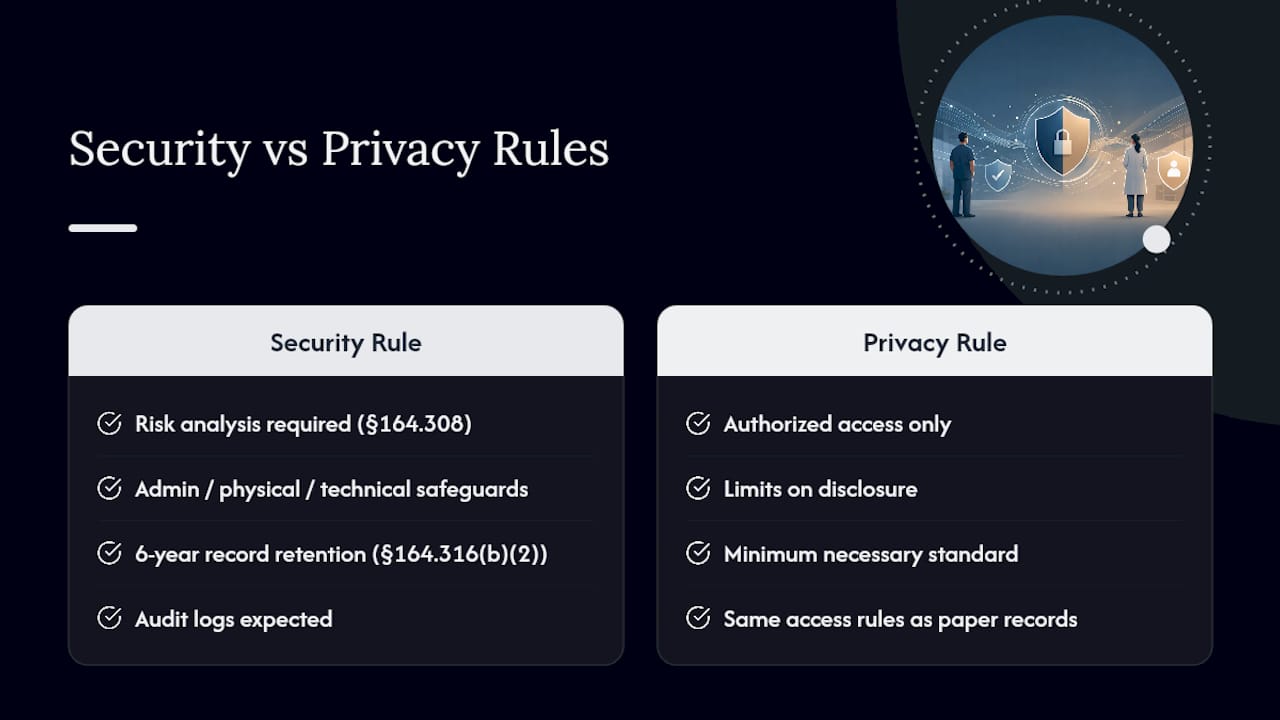
OCR enforcement patterns give a clear signal about where facilities get tripped up. Settlement histories and industry reviews point to a repeating cluster of failures: missing audit logs, cloud storage deployed without a signed BAA, shared login credentials across security staff, and retention policies nobody can produce when asked. HIPAA Journal’s coverage of video surveillance documents these patterns across multiple incidents, and none of them involve exotic technical failures. They’re governance gaps, and they’re the ones an administrator can close before an auditor ever asks.
How Do You Build a Compliant Surveillance Policy?
A camera system without a written policy is a liability wearing a lens. The policy is what turns a security tool into a documented, defensible part of your compliance program, and OCR will ask for it by name if there’s ever an incident.
Start with the risk assessment itself. Walk the facility with a map of every camera location, note what each one captures, and flag anywhere a lens might pick up a patient’s face alongside a clinical or scheduling cue. Document the finding, the mitigation (masking, repositioning, access restriction), and the date. This assessment isn’t a checkbox exercise. It’s the record that shows OCR you thought about the risk before something went wrong, not after.
From there, build the policy around five components:
- Purpose statement. Define why cameras exist (safety, theft prevention, infection-control monitoring) and what they are not for (clinical documentation, employee performance surveillance beyond safety needs).
- Retention schedule. Set a specific number of days footage is kept, tied to your risk assessment and any state law that applies to your facility.
- Access approval process. Name who can request footage, who approves that request, and how the approval gets logged.
- Breach procedure. Spell out what happens if footage is accessed improperly, exported without authorization, or a storage device goes missing.
- Review cadence. Commit to revisiting the policy on a fixed schedule, not whenever someone remembers to.
Workforce training has to be specific to camera handling, not folded into general HIPAA refreshers. Staff who monitor live feeds or pull archived footage need to understand minimum necessary the same way front-desk staff understand it for charts. Recertify access permissions quarterly. If your Notice of Privacy Practices doesn’t mention that surveillance footage may be used or disclosed as part of health care operations, update it. Patients have a right to know.
What Technical Controls Does the Security Rule Require for Camera Systems?
Every login into your video management system should belong to one person, tied to a unique ID, with no exceptions for convenience. Shared “security” or “front desk” logins are one of the most commonly cited failures in OCR review, because they make it impossible to answer a basic question: who looked at this footage, and when?
Multi factor authentication should sit on every account with remote access to camera feeds, not just administrator accounts. Session timeouts matter more than most facilities realize. A workstation left logged into a live feed in an unattended office is functionally the same risk as an unlocked filing cabinet full of charts. Build role based access so a security guard can view live feeds without being able to export archived footage, and a compliance officer can pull records without touching live monitoring.
Audit logs need to capture more than a login timestamp. A defensible log records who accessed which camera feed or archived clip, what action they took (view, export, delete), and when. Logs should be tamper evident and stored somewhere separate from the video management system itself, so a compromised NVR can’t erase its own history. Review logs on a set cadence, not only after something goes wrong.
- Encrypt video in transit using TLS 1.2 or higher, or SRTP for streaming feeds, so footage can’t be intercepted between the camera and storage.
- Encrypt archived footage at rest with AES-256, and manage encryption keys separately from the storage system itself.
- Segment camera network traffic away from clinical and billing systems, so a compromised camera can’t become a pathway into patient records.
- Require a VPN or zero-trust gateway for any remote viewing, and disable unencrypted SD card storage on individual cameras, since a stolen card is an unencrypted archive walking out the door.
NIST SP 800-66 Rev. 2 maps each of these controls directly to specific Security Rule specifications, and it’s the reference most compliance officers keep open while configuring a new VMS.
Pro Tip: Test your audit log by pulling a report for a single camera over the last 30 days before you go live. If you can’t produce a clean answer to “who viewed this and when,” fix the logging configuration before the system captures a single frame of real patient activity.
Where Should Cameras Go, and Where Should They Never Go?
Entrances, lobbies, loading docks, and pharmacy corridors are generally fair territory for surveillance, because the privacy expectation in those spaces is lower and the security benefit is real. Restrooms, locker rooms, and exam or treatment rooms are a different matter entirely. Placing a camera in any of those spaces without explicit, documented consent isn’t a gray area. It’s a placement most facilities should avoid outright, and state laws in many jurisdictions reinforce that line with criminal, not just civil, penalties.
A few placement habits reduce risk without reducing safety value:
- Use privacy masking to blur or block areas within a camera’s field of view where patients might be identifiable but aren’t the security concern, such as a check-in counter visible from a hallway camera.
- Choose fixed-lens cameras over pan-tilt-zoom models in sensitive corridors, since a fixed lens can’t be redirected toward an exam room door by accident or misuse.
- Disable audio recording unless there’s a specific, documented safety reason for it. Audio dramatically increases the chance of capturing PHI through conversation.
- Angle cameras to avoid capturing computer screens, patient wristbands, or whiteboards listing room assignments and provider names.
Retention windows vary by state, but a defensible default for most healthcare systems lands between 60 and 90 days, unless a specific incident requires holding footage longer. Whatever window you choose, document the reasoning and dispose of expired footage through a method that makes recovery impossible, not just deletion from a file directory.
When Do Camera Vendors Need a Business Associate Agreement?
The moment a cloud storage provider, managed video service, or remote monitoring company creates, receives, maintains, or transmits footage that might contain ePHI, that vendor is a Business Associate. A signed BAA has to be in place before any footage reaches their systems, not after the fact once you realize a vendor has access.
A BAA for a video surveillance vendor should spell out specific terms most generic templates miss:
- Permitted uses of the footage, explicitly limited to the purpose you’ve defined in your surveillance policy.
- Breach reporting timelines that match or exceed HIPAA’s own notification requirements, so you’re not waiting on a vendor to tell you about an incident.
- Subcontractor flow down language, since many cloud video platforms rely on third-party storage or analytics providers who also need coverage.
- Return or destruction terms for footage once the relationship ends, and clarity on who holds encryption keys during and after the contract.
On-premises systems keep more of the compliance burden with you directly. You control the encryption keys, you own the audit trail, and you’re solely responsible for breach response if a server is compromised. Cloud deployments shift some of that work to the vendor, but only the parts the BAA actually assigns to them. Many facilities run a hybrid model, on-prem NVRs at the main campus and cloud storage for satellite clinics, and that split means your access controls and audit review process need to account for both systems separately, not treat them as one.
Building a HIPAA Camera Deployment Checklist
A surveillance rollout that skips documentation almost always surfaces its gaps at the worst possible time, usually during an OCR audit or after a breach. The fix is sequencing the work the same way every time.
Before installation, map every camera location against your risk assessment, decide your retention window, and settle whether footage lives on-prem, in the cloud, or split across both. If any vendor touches the data, get the BAA signed before the first camera goes live, not during a post-incident scramble.
During deployment, configure unique login IDs and MFA for every account, turn on audit logging from day one, apply privacy masks to sensitive fields of view, disable audio unless justified, and segment the camera network from clinical systems.
After go-live, the work doesn’t stop:
- Update camera and NVR firmware on a fixed schedule, not only when something breaks.
- Recertify who has access to live feeds and archived footage every quarter.
- Reassess your surveillance risk analysis annually, or sooner if you add cameras, change vendors, or open a new location.
- Audit for shared accounts and unrestricted export permissions, both of which tend to creep back in as staff turnover happens.
The most common failure isn’t a technical one. It’s a missing BAA discovered months after a cloud vendor was already storing footage, or a shared login that five different security staff have been using for two years because nobody set up individual accounts. Both are fixable in an afternoon once someone notices them.
Pro Tip: Put a recurring calendar reminder on the compliance officer’s calendar for quarterly access recertification. The facilities that stay clean on audits are the ones that treat this as routine, not the ones that scramble every time OCR sends a letter.
Balancing Safety and Privacy in Surveillance Design
The instinct to add more cameras after any safety incident is understandable, but more coverage without more governance just multiplies your compliance exposure. The facilities that get this right treat every new camera placement as a decision requiring sign-off from clinical leadership, compliance, and security, not a unilateral call by whoever manages the building.
Tabletop exercises, where your team walks through a hypothetical breach or subpoena request for footage, surface gaps that a paper policy never will. Review the program at least annually, and treat every new vendor relationship or facility expansion as a trigger for a fresh look, not an update to a five-year-old document.
— Safes and Security Solutions
Choosing HIPAA-Aware Hardware and Configuration Support
Most of the compliance failures covered above trace back to hardware and configuration choices made before anyone thought through the HIPAA implications. Some providers specialize in encrypted cameras, secure NVR systems with audit logging and access-control features required by risk assessments, and locked media storage for facilities needing physical security around archived footage, not just digital.

If your current setup relies on unencrypted SD card storage or a single shared login for your security team, that’s a configuration problem worth fixing before it becomes an audit finding. For facilities storing sensitive backup drives, exported footage, or paper documentation of your risk assessments, a burglary and fire safe adds a physical layer of protection that complements your digital access controls. Browse the surveillance camera systems and secure storage options on the Safes and Security Solutions site, or reach out to the support team for guidance on matching hardware to your facility’s specific retention and access requirements.
Sources
- HHS — Security Rule guidance
- NIST SP 800-66 Rev. 2
- HIPAA Journal — HIPAA and video surveillance (updated 2026)
This article is general information, not a substitute for advice from a qualified lawyer. Consult a qualified legal professional about your own circumstances before acting on anything here.
FAQ
Are Security Cameras a HIPAA Violation?
No, cameras themselves don’t violate HIPAA. A violation happens when footage that qualifies as PHI lacks proper safeguards, like missing access controls, no BAA with a cloud vendor, or no documented risk analysis.
What Are the New HIPAA Security Rules in 2026?
HIPAA’s core Security Rule framework under 45 CFR Part 164 hasn’t changed its structure, but OCR enforcement continues to focus heavily on physical safeguards, audit logging, and BAA compliance for cloud-connected systems, including video surveillance.
Can My Boss Watch Me on Camera All Day?
Employers generally can monitor common work areas for safety and security purposes, but HIPAA specifically governs footage that captures patients in a health care context, not general employee monitoring in non-clinical spaces.
What Are the Top HIPAA Violations Involving Cameras?
The most frequently cited failures involve missing audit logs, cloud video storage without a signed Business Associate Agreement, shared login credentials among security staff, and retention or disposal policies that don’t exist in writing.
Are Security Cameras HIPAA Compliant in Patient Rooms?
Cameras in patient rooms require explicit documented consent and strict access controls, since that space carries the highest privacy expectation in a healthcare facility; placement there without consent is generally avoided.