

Office Access Control Guide for Property Managers
Run a scored site assessment first, before you buy anything. That single step turns a vague sense of “we should upgrade security” into three concrete deliverables: a prioritized list of gaps, a hardware spec sheet vendors can bid against, and an installation acceptance checklist you’ll use to sign off on the finished job. Skip it, and you’re guessing at door counts and camera placement instead of buying what the building actually needs.
A proper government office access control guide, adapted for private and commercial offices, starts with inspection, not procurement. Before you call an installer or request a quote, you need to know what you’re protecting, where the actual weak points sit, and which doors, readers, and cameras matter most. Here’s the immediate 72-hour plan:
- Walk the property with a scored assessment checklist covering perimeter, doors, readers, video, alarms, and visitor controls.
- Require OSDP-supported readers on any new bid, not legacy Wiegand hardware, since OSDP encrypts reader-to-panel communication.
- Set a log retention policy that ensures audit trails exist when you need them before you sign any vendor contract.
- Draft a one-page procurement brief naming Safes and Security Direct or a comparable supplier as your hardware source, plus the installer who will handle cabling and commissioning.
Key Takeaways
A scored site assessment, OSDP-capable readers, 90-day log retention, and certified safes rated for your specific fire and burglary exposure together form the foundation of a defensible office access control program.
| Point | Details |
|---|---|
| Run the scored assessment first | Score perimeter, doors, readers, video, alarms, and visitor controls before requesting any bids. |
| Prioritize by score, not instinct | Convert scores of 4 to 5 into immediate fixes, 2 to 3 into 30 to 90 day remediation. |
| Specify OSDP readers | Request encrypted reader-to-panel communication over legacy Wiegand wiring on every new bid. |
| Retain logs for 90 days minimum | Set retention policy in writing before signing any installer contract. |
| Rate safes to actual risk | Match burglary and fire ratings, like those on American Security’s BFS2214, UL1511, and BFS1512, to what you’re actually storing. |
Table of Contents
- What Is a Government Office Access Control Guide, and Who Needs One?
- How Do You Run a Scored Site-Assessment Checklist?
- What Should You Check During the Physical Security Walkthrough?
- How Should You Manage Access Credentials and Admin Accounts?
- Where Should Security Cameras Go, and How Long Should Footage Be Kept?
- How Do Alarm Systems and Monitoring Fit Into Access Control?
- What Hardware Specs Should You Require From Vendors?
- How Do You Plan Procurement and Installation Without Rework?
- How Often Should You Test and Maintain the System?
- What Do Costs and Timelines Look Like by Office Size?
- How Do You Prepare Staff for Lockdowns and Manage Visitors?
- What We’ve Learned From Reviewing Office Security Projects
- How Safes and Security Direct Supports Your Procurement
- Sources
What Is a Government Office Access Control Guide, and Who Needs One?
Despite the name, this kind of guide isn’t really about federal facilities. It’s the framework property managers, business owners, and security installers use to plan and buy access control for private offices: card readers, electrified locks, cameras, alarms, and safes, sized and specified correctly for a real building. The “government” framing shows up in search results because public-sector procurement standards set a high bar for documentation and testing, and private offices increasingly borrow that rigor.
If you manage a law office, a medical practice, a multi-tenant building, or a small headquarters, you need the same three things a federal facilities manager needs: a documented assessment, hardware that meets recognized ratings, and a maintenance schedule that keeps the system auditable. The difference is scale and compliance burden, not the underlying discipline.
How Do You Run a Scored Site-Assessment Checklist?
A walkthrough without scoring produces opinions. A walkthrough with scoring produces a Bill of Materials. The distinction matters because vendors bid on specs, not impressions, and your budget approval process needs numbers, not adjectives.
Bring the right people to the walkthrough: the property manager or owner, whoever handles IT (they’ll own network segmentation questions), and ideally the installer who’ll bid the job. Walking a 15,000-square-foot office alone means missing things a second set of eyes catches, particularly around server rooms and after-hours entry points.
- Score each area on a simple scale (1 to 5, where 1 is “adequate” and 5 is “immediate risk”) across perimeter, doors and locks, readers and credentials, video coverage, alarms, visitor and contractor controls, connected-systems protection, and emergency readiness.
- Photograph and log every gap with location, current hardware (if any), and the specific deficiency, not a vague note like “needs work.”
- Convert scores 4 to 5 into “immediate” priority, scores 2 to 3 into “remediate in 30 to 90 days,” and scores of 1 into “monitor, no action needed now.”
- Total the scores by section to see where the building’s actual risk concentration sits. A building might score fine on locks but terribly on visitor management.
- Translate every “immediate” and “remediate” item into a line on your Bill of Materials, with model numbers, quantities, and rough unit costs.
Tools like System Surveyor let you map a facility digitally during the walkthrough and auto-generate a BOM as you place devices, which saves a full round of follow-up measurements.
Pro Tip: Do the walkthrough at two different times of day. A reception area that looks fully visible at 10 a.m. can turn into a blind spot after the lobby lights dim at 6 p.m.
What Should You Check During the Physical Security Walkthrough?
Start outside and work in. Perimeter lighting gets skipped constantly because it seems like a facilities issue rather than a security one, but poor lighting is the single easiest thing for an intruder to exploit and the cheapest thing for you to fix.
Walk the fence line and parking areas looking specifically for concealment points: dumpster enclosures, utility sheds, overgrown landscaping near entrances. Note where vehicles can approach unseen from the street, and where security cameras would have to point to eliminate that blind spot.
Door-level inspection takes longer and matters more. Check frame condition (a warped frame defeats even the best electric strike), latch behavior, and threshold gaps large enough to slip a shim through. Confirm whether each door can physically support electrified hardware, since older hollow-metal frames sometimes need reinforcement before a maglock or electric strike will hold.
- Loading docks need their own credential tier since delivery staff shouldn’t hold the same access as employees.
- Rooftop access and mechanical rooms are frequently unlocked because “nobody goes up there,” which is exactly why they need a reader or at minimum a monitored contact.
- Stairwells connecting floors in multi-tenant buildings need door position sensors so a propped fire door triggers an alert instead of sitting open all afternoon.
- Reception visibility drives your first camera placement decision: if the front desk can’t see the entrance sightline directly, a camera has to cover it instead.
Pro Tip: Check egress requirements before specifying fail-secure hardware on any exit door. Fire code in most jurisdictions requires free egress regardless of the access-control state, so a fail-secure lock on the wrong door can create a code violation, not just a security gap.
How Should You Manage Access Credentials and Admin Accounts?
Credential mismanagement, not weak hardware, causes most real-world access failures. A building with excellent locks and a bloated, unreviewed credential list is less secure than one with modest hardware and tight administration.
- Provision new credentials only through a documented request, tied to a named employee and a specific access level, never a blanket “all doors” grant by default.
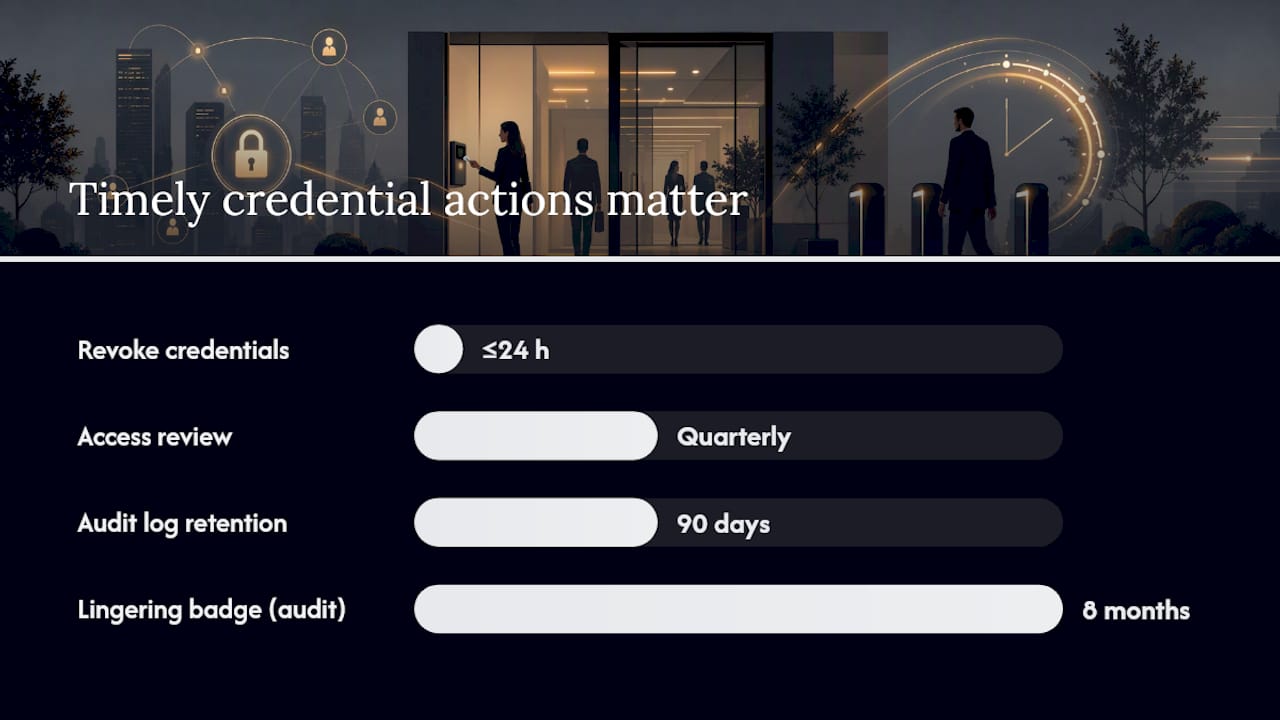
- Modify access as roles change, reviewing every credential against current job function at least quarterly.
- Revoke credentials the same day employment ends, ideally within 24 hours, since delayed deprovisioning is one of the most common gaps auditors find.
Treating physical access as part of identity and access management rather than a standalone system means applying the same least-privilege principle you’d use for network logins.
- Assign named admin accounts, never a shared “admin” login that makes changes untraceable.
- Retain audit logs for at least 90 days, longer if your industry (legal, medical, financial) has its own retention expectations.
- Document every vendor or technician login separately, with its own expiration date, so a contractor’s access doesn’t quietly persist for years after the project ends.
For reader hardware, request OSDP support over legacy Wiegand wiring wherever the budget allows, since OSDP encrypts communication between reader and control panel and supports two-way diagnostics. Mobile credentials cut down on lost-card administration, while biometric readers add a layer that’s hard to lose or share, though they cost more per door and raise privacy questions worth discussing with staff upfront.
Pro Tip: Run a quarterly access review even if nothing seems wrong. The most common finding isn’t a hacked system, it’s a former employee’s badge still active eight months after they left.
Where Should Security Cameras Go, and How Long Should Footage Be Kept?
Camera placement decides whether footage is useful evidence or just a wide, blurry reminder that something happened. Every entry and exit point needs a camera angled to capture faces at a consistent height, not a wide establishing shot that catches the whole parking lot but nobody’s face clearly.
Loading docks, stairwell doors, and any secondary exit deserve their own camera, not coverage borrowed from a lobby unit angled the wrong direction. Video systems serve both deterrence and forensic purposes, and recordings only help investigators when the NVR or VMS appliance itself sits in a locked room or cabinet, not an open closet anyone can access.
| Office size / risk level | Typical retention target | Storage approach |
|---|---|---|
| Small office, low risk | 30 days | On-prem NVR/DVR |
| Medium office, moderate risk | 90 days | Cloud VMS with local backup |
| High-security or regulated office | 90+ days | Cloud VMS with redundant on-prem archive |
Low-light performance matters significantly. A camera that produces excellent daytime footage but performs poorly after dark is only doing half its job, and after-hours incidents are when clear footage matters most.
- Segment CCTV traffic on its own VLAN, separate from office data traffic, to limit what a compromised camera could reach.
- Change every default password on every camera and NVR before commissioning, not after the first incident.
- Limit remote access to named accounts with two-factor authentication, and confirm firmware update schedules with your installer in writing.
How Do Alarm Systems and Monitoring Fit Into Access Control?
Alarm systems and access control should share data, not run as separate silos. A door forced open outside business hours should trigger both an access-control event log and an alarm zone alert, ideally routed to the same monitoring dashboard.
- Door contacts and motion detectors need zoning that maps to actual access-control schedules, so a door unlocked by a valid badge doesn’t trip a false alarm.
- Glass-break sensors belong on ground-floor windows and any door with adjacent glazing, a spot burglars target specifically to avoid the lock entirely.
- Dual-path communication (IP plus cellular backup) matters most for buildings that can’t tolerate a monitoring gap during an internet or power outage; insist on it for any office holding cash, controlled substances, or client records.
- Panic and duress integration lets a receptionist trigger a silent alarm from the same reader panel controlling the front door, without a separate system to learn.
- Test alarm acceptance with the monitoring central station before final signoff, confirming response times and escalation contacts on file.
What Hardware Specs Should You Require From Vendors?
Bids that don’t specify certifications aren’t comparable bids. Insist on the same documentation from every vendor so you’re evaluating apples to apples, not a vague “commercial-grade” claim from one installer against a UL number from another.
| Component | Minimum spec to require |
|---|---|
| Exterior electrified locks | UL listed, appropriate IP rating for outdoor exposure, fail-secure on egress doors |
| Interior electrified locks | Fail-safe or fail-secure per fire code, rated for expected cycle count |
| Card/mobile readers | OSDP support, encrypted credential format, anti-tamper alarm output |
| Biometric readers | Documented false-accept/false-reject rates, liveness detection |
| Commercial safes | UL burglary and fire ratings, documented boltwork, internal capacity to spec |
For secure storage, Safes and Security Solutions carries American Security models built to exactly these documented standards. The BFS2214 and BFS1512 combine burglary and fire ratings in one unit, useful where a single safe needs to protect cash and records from both theft and fire. The UL1511 carries a two-hour UL fire rating specifically, a better fit where fire protection for documents and media matters more than burglary resistance. Ask any vendor for the datasheet showing burglary rating, fire rating in hours, internal dimensions, and boltwork configuration before you compare price.
How Do You Plan Procurement and Installation Without Rework?
A Bill of Materials without a cabling plan is an incomplete order. Confirm Power over Ethernet capacity against your actual device count before ordering, since undersized PoE switches are a common and entirely avoidable source of mid-installation delays.
- Finalize the BOM with exact model numbers, firmware versions, and confirmed vendor support windows.
- Map cabling and power needs door by door, deciding PoE versus local power for each device.
- Schedule installation in phases if the office is occupied, favoring after-hours work for disruptive tasks like core drilling.
- Run device-level functional tests on every reader, lock, and camera before broader system testing begins.
- Test the full event chain: badge presented, door unlocks, event logs to the VMS or access-control software correctly.
- Simulate a power and network outage to confirm failover behavior on doors and alarm communication.
- Confirm integration points: visitor-management software, elevator or floor control if applicable, and log forwarding to any central archive.
Professional installers follow a defined sequence of survey, infrastructure, device mounting, configuration, and commissioning, precisely because skipping steps is what causes expensive callbacks. A pre-installation site survey also catches obstacles, like an unexpected conduit run or a door that won’t accept a strike plate, before the crew is on-site with the wrong parts.
- Confirm vendor access documentation for any remote diagnostics account before commissioning.
- Request written service-level expectations for firmware support and response time on failures.
- Verify audit-log forwarding to your central archive or SIEM works before signing off, not after the first incident.
How Often Should You Test and Maintain the System?
Untested systems fail quietly. A door contact that’s been silently offline for three months looks identical to one working perfectly, right up until the moment it matters.
| Frequency | Task |
|---|---|
| Daily | Review overnight alarm and access-control event logs |
| Weekly | Spot-check camera footage quality and door hardware function |
| Monthly | Test alarm communication paths and battery backup |
| Annually | Full system audit, firmware update review, and credential audit |
Retain access logs for 90 days at minimum, longer where industry rules require it, and assign a specific person to sign off on periodic audit reviews rather than leaving that responsibility ambiguous. Document firmware update windows and vendor support SLAs in writing, and keep a written emergency-override procedure so a system failure during a genuine crisis doesn’t leave staff locked in or locked out.
What Do Costs and Timelines Look Like by Office Size?
Budget ranges shift enormously based on door count, camera count, and how much existing cabling can be reused instead of pulled fresh.
- Small office (under 5,000 square feet, 2 to 4 doors): Expect a modest hardware-plus-installation budget concentrated on a handful of readers, a few cameras, and one safe. Timeline runs a few weeks from assessment to handover.
- Medium single-floor office (5,000 to 20,000 square feet): More doors, full perimeter camera coverage, and likely a dedicated alarm zone plan. Plan for a longer procurement and installation window, often several weeks to a couple of months depending on cabling needs.
- Multi-floor office: Elevator integration, stairwell monitoring, and per-floor access zoning add both cost and coordination time, often stretching the project past two months when phased around occupied hours.
Major cost drivers include existing cabling condition, door hardware compatibility with electrified locks, and whether you’re specifying cloud VMS (lower upfront cost, ongoing subscription) versus on-prem storage (higher upfront cost, no recurring fee). Staging installation after hours, and commissioning floor by floor rather than all at once, reduces disruption but extends the calendar timeline. Common delays trace back to unordered long-lead items like specialty door hardware, not the actual installation labor.
How Do You Prepare Staff for Lockdowns and Manage Visitors?
Hardware without trained people behind it underperforms. Staff need to know arming and disarming procedures, how to respond to an alert, and basic first-level troubleshooting before a real incident tests the system for the first time.
- General staff need to know evacuation routes, how to report a propped door, and who to call if a reader malfunctions.
- Managers need arming and disarming authority and a clear escalation path for after-hours alerts.
- Named security operators should run quarterly drills, not just annual ones, since infrequent drills lead to hesitation during actual events.
Visitor and contractor management deserves its own workflow, separate from employee credentials. Pre-registration, temporary credentials with a hard expiry date, host notification on arrival, and a logged audit trail together close one of the most commonly exploited gaps: long-lived guest access nobody remembers to revoke.
Pro Tip: Test your lockdown procedure with a scheduled, announced drill first. Running an unannounced test before staff understand the process usually creates confusion instead of useful data.
What We’ve Learned From Reviewing Office Security Projects
Skipping the formal assessment is the single most expensive mistake we see, consistently more costly than any hardware choice. Buildings that jump straight to buying readers and cameras end up overspending on doors that didn’t need upgrading while missing the loading dock or rooftop access point that actually mattered.
Credential lifecycle management gets underinvested constantly. Property managers will spend real budget on a biometric reader for the front door, then leave a shared “admin” login on the software controlling every door in the building. That’s backwards. The administrative discipline protecting the system matters as much as the hardware guarding the door.
Network segmentation is the quiet failure point nobody budgets for. Cameras and access-control panels sitting on the same network as office workstations create a path from a compromised laptop straight to the security system itself, a risk that costs almost nothing to fix at installation time and a great deal to fix afterward.
Camera placement and maintenance SLAs are the two areas that pay off disproportionately relative to their cost. A well-placed camera at the right height, a documented firmware update schedule, and a named person reviewing logs monthly will outperform a bigger hardware budget spent without that discipline behind it.
How Safes and Security Direct Supports Your Procurement
Safes and Security Direct gives property managers and installers a direct path to certified hardware without the markup or lead times that come with going through a general contractor’s supply chain. Once your assessment identifies which doors, cameras, and storage units need upgrading, you’re buying from documented product specs, not a vague vendor promise.

For secure storage, the American Security BFS2214 fits offices needing combined burglary and fire protection for cash and records in one unit. The American Security UL1511 is the better call where a two-hour fire rating on documents and media matters more than burglary resistance. The American Security BFS1512 works well for offices that need a smaller footprint without giving up dual protection.
Beyond product selection, Safes and Security Direct supports the procurement side directly: confirming model numbers against your Bill of Materials, coordinating delivery timing with your installer, and standing behind manufacturer warranty and support questions after the sale. If you’re ready to move from checklist to cart, request a quote on any of these models, or reach out to talk through which safe rating fits your specific risk profile before you commit.
Sources
The BTI Commercial Security Self-Assessment Checklist covers the scored survey format referenced throughout the assessment sections. SecurityScorecard’s access control overview explains credential lifecycle and least-privilege principles in more depth. Honeywell’s commercial building access control insights detail credential types and visitor management integration. TechPro Security’s layered protection guide walks through zone-based design. Athenalarm’s installation guide breaks down the full installation sequence step by step.
For cabling and access-control installation specifics, Cables & Chips’s CCTV and access control guidance offers a contractor’s perspective on low-voltage infrastructure planning. For related reading, Safes and Security Solutions covers security upgrade planning for offices, building an office security plan step by step, and video surveillance placement strategy.
How long does a full office access control upgrade take? A small office typically completes assessment through handover in a few weeks; multi-floor buildings with elevator integration often run past two months.
What’s the minimum log retention period for access control systems? Ninety days is a common baseline, though regulated industries like legal and medical offices often require longer retention under their own compliance rules.
Do all doors need electrified locks? No. Reserve electrified hardware for doors identified as high priority in your scored assessment; lower-risk interior doors often only need standard locks and monitoring contacts.
Should safes be rated for both fire and burglary, or just one? It depends on what’s stored. Cash and valuables need burglary ratings; paper records and media need fire ratings measured in hours; many offices need both, which is why combined-rating models like the BFS2214 and BFS1512 exist.
- BTI Commercial Security Self-Assessment Checklist (PDF)
- What is access control: components and types — SecurityScorecard
- Commercial Security System Installation: 12 Proven Steps — Athenalarm
Recommended
- Top security best practices for property managers 2026 – Safes and Security Direct
- Setting up access control systems: a complete 2026 guide – Safes and Security Direct
- Industry Security Best Practices: Protect Property and Reduce Risk – Safes and Security Direct
- Office security plan: Step-by-step to a safer workplace – Safes and Security Direct