

Protect Drives Under 125°F: Media Safes for Home and Small Business
A media-rated fire safe, not a standard document safe, is what actually protects hard drives, tapes, and backup discs from heat damage, because paper survives temperatures that melt magnetic media. A good starting point for most home and small-business buyers is Gardall’s UL-certified data-media safe line, with a step up to a 120-minute EN 1047-1-rated unit for archival or IT server-room use.
TL;DR:
- Media safes must maintain interior temperatures below 125°F and humidity under 80% during a fire to protect digital media effectively.
- The safest choice depends on your risk profile, with home safes rated for 30 to 60 minutes, small office safes for 60 to 120 minutes, and enterprise safes for 120 minutes or more.
- Always verify certification claims through independent bodies like UL or ETL to ensure the safe meets specific fire, water, and impact standards.
- Consider lock type, interior layout, and capacity carefully to match your access needs and media storage requirements.
- Regularly check and rotate stored media, and bolt safes down to prevent theft without compromising fire resistance.
Table of Contents
- What Makes the Best Media Safes Different From Document Safes
- Which Media Safes Should You Actually Buy?
- How Do You Evaluate a Media Safe Before Buying?
- Which Media Safe Fits Your Situation?
- How Do You Know These Recommendations Are Reliable?
- What Actually Matters Once You’ve Bought a Media Safe
- Where to Find the Right Media Safe for Your Situation
- Sources
What Makes the Best Media Safes Different From Document Safes
A document safe and a media safe often look identical from the outside. Open one up during a fire and the difference becomes obvious fast. Paper chars at around 400°F, so most fire-rated document safes are engineered to keep interior temperatures under that mark. Hard drives, LTO tapes, and optical discs start warping and losing data well before then, often somewhere in the 125°F to 150°F range depending on the media type.
That gap is why a safe labeled “fireproof” isn’t automatically safe for a backup drive. The StoreMore Media Fire Safe product page states its unit maintains an interior temperature below 125°F and holds humidity under 80% for up to two hours during a fire event, which is the kind of spec a document safe simply doesn’t need to meet. Humidity control matters here too. A fire generates steam and moisture inside a sealed box, and that moisture can corrode drive platters or warp tape reels even if the temperature itself stayed low enough.
Buyers searching for the best media safes usually assume any UL-listed fire safe will do the job. It won’t, not reliably. The safes that earn a place on this list are built and tested specifically against media-grade thresholds, not paper-grade ones, and that distinction should drive the entire buying decision.
Which Media Safes Should You Actually Buy?
Three product families cover almost every use case a homeowner or small-business buyer will run into: compact data safes for home backups, mid-tier UL-classified units for small offices, and heavy-duty European-standard safes for archives and server rooms. Here’s how they stack up.
Gardall data-media safes sit at the top of the recommendation list for most buyers. Gardall’s UL-certified data-media safe line is built around fire and data protection specifically, not adapted from a general-purpose document safe design. These units typically come with a UL classification tied to media-specific temperature limits, a dedicated interior configuration for drives and tapes, and either an electronic keypad or key lock depending on the model. They fit well for a small business archiving financial records on external drives, a photographer backing up years of client work, or a homeowner protecting a NAS backup drive alongside family documents.
Master Lock’s STW123GTCML is a widely available option for buyers who want a recognizable brand name and a straightforward two-hour rating. The product page lists UL classification for two hours of fire resistance at 1850°F, plus ETL verification for water resistance up to 8 inches of submersion for 24 hours. That combination of fire and water verification is rare at this price point, and it makes the STW123GTCML a solid pick for a home office that wants one safe to cover both paper backups and a couple of external drives. It won’t match a dedicated data-safe’s internal climate control, so treat it as a strong general-purpose option rather than a specialist tool.
StoreMore’s Media Fire Safe targets buyers who need a larger footprint and don’t mind paying for it. The unit runs around $2,899 and is built to maintain that sub-125°F, sub-80%-humidity interior for two hours, according to its own product listing. At 21 inches wide, 21 inches deep, and 32 inches tall, it has real capacity for a small business storing multiple hard drives, backup tapes, and file boxes together. This is the option for an office that outgrew a single small safe but isn’t ready to invest in an enterprise archival unit.
Archival and IT-grade safes referencing EN 1047-1, like the MD2175 fireproof media safe, sit at the high end. These reference European S120DIS testing protocols built around 120 minutes of data protection, which is double the duration of most consumer-grade units. They’re built for server rooms, IT departments, and organizations with regulatory retention requirements where losing backup data isn’t an option regardless of cost.
Before buying any of these, confirm the same core specs across every model you’re comparing:
- Fire rating and duration. Look for a specific number (30, 60, or 120 minutes) tied to a named test standard, not just the word “fireproof.”
- Internal temperature threshold. The safe should state what interior temperature it maintains, ideally under 125°F for media protection.
- Humidity control. A humidity ceiling (commonly 80% or lower) during the fire-rated period matters as much as temperature.
- Waterproofing claims. Check whether the rating comes from an independent body like ETL, and what depth and duration it covers.
- Lock type. Key, mechanical combination, digital keypad, or biometric, each with different tradeoffs for speed and shared access.
- Capacity and interior layout. Confirm the safe has actual media trays or shelving, not just an empty document-safe interior.
- Price band. Compact home units start in the low hundreds; two-hour UL units with waterproofing run several hundred to over a thousand dollars; large archival-grade safes often land in the $2,500 to $4,000-plus range.
None of these families require you to take a spec sheet at face value. The next section walks through exactly how to verify what a manufacturer claims before you commit to a purchase.
How Do You Evaluate a Media Safe Before Buying?
Every safe on the market claims to protect your data. Not every claim survives scrutiny, and the difference between a safe that actually works and one that only sounds impressive comes down to five things you can check yourself.
-
Confirm the internal temperature and humidity thresholds. A media safe worth buying will state, in specific numbers, what temperature and humidity it maintains inside during a fire. Anything under 125°F is the benchmark most vendors cite for protecting magnetic and optical media, and StoreMore’s spec sheet backs the threshold with a humidity ceiling claim.
-
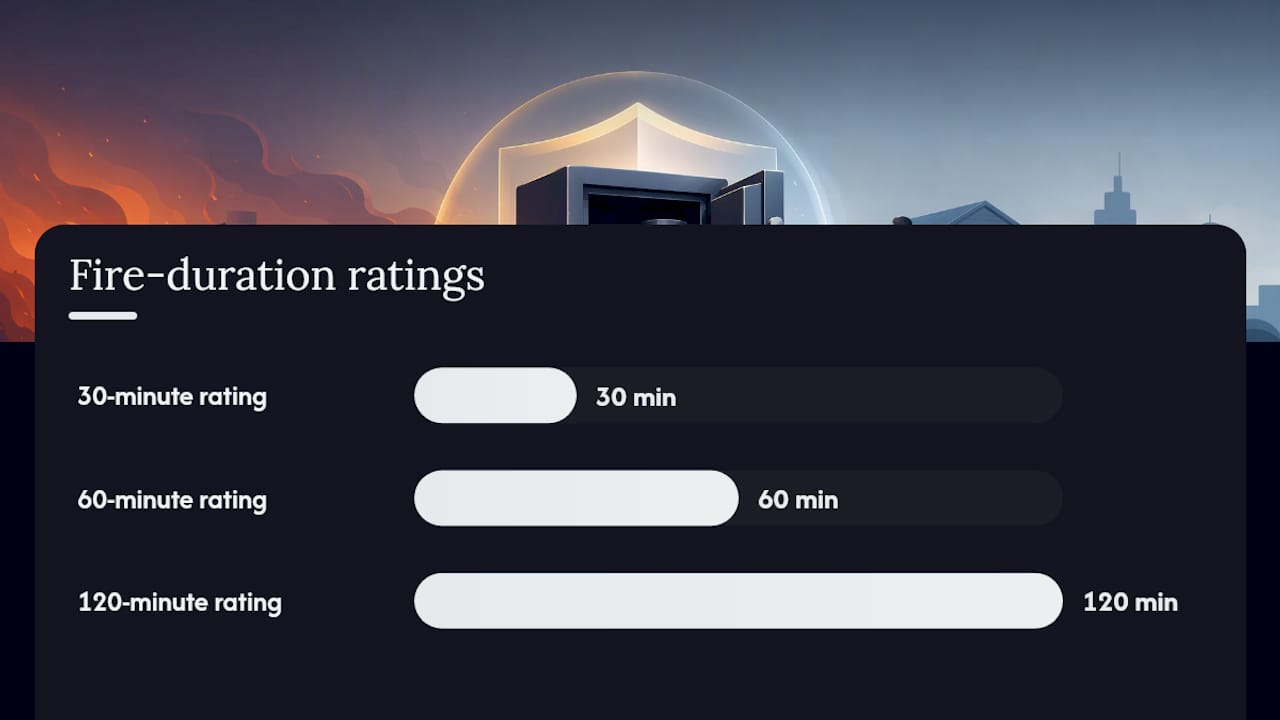
Match the fire-duration rating to your realistic risk. A 30-minute rating covers a fast-response residential fire where firefighters arrive quickly. A 60-minute rating covers a slower response or a larger structure. A 120-minute rating, the kind referenced by EN 1047-1-compliant safes, is built for scenarios where a fire could burn unchecked for hours, which is more relevant to a commercial building than a single-family home.
-
Check whether waterproofing is tested or just implied. Sprinkler systems and firefighting hoses dump enormous amounts of water into a burning structure. A safe that survives fire but lets water seep in can still destroy a hard drive. The Master Lock STW123GTCML’s ETL verification for submersion resistance is the kind of independently tested claim you want to see, not just a manufacturer’s marketing language.
-
Weigh lock type against how many people need access. A key lock is fastest for a single user but has no audit trail and no recovery if the key is lost. A mechanical combination lock skips the lost-key problem but is slower under stress. Digital keypads and biometric locks add convenience and access logs for multiple employees, at the cost of needing battery power or backup key override.
-
Verify the certification, don’t just trust the label. “UL Classified” and “ETL Verified” mean a third party tested the product against a defined standard. You can confirm a listing directly through UL’s certification database or through Intertek’s testing and certification services, which is the parent organization behind ETL marks. If a safe’s product page mentions a certification but doesn’t name the certifying body or a verifiable model number, treat that as a red flag rather than a feature.
Pro Tip: Search the certifying body’s database directly using the exact model number printed on the safe’s data plate, not the marketing name used on the retail listing. Manufacturers occasionally market a safe under a different name than the one filed with UL or ETL, and a mismatch is the fastest way to catch an inflated claim.
Sizing and internal organization deserve a look too. A safe with loose interior space lets drives and tapes shift and collide during handling or a fall. Look for adjustable shelving or dedicated media trays instead of a bare metal box, especially if you’re storing a mix of hard drives, USB backups, and paper documents together.
Which Media Safe Fits Your Situation?
The right safe depends less on brand preference and more on what you’re protecting and how fast you need to react if disaster hits.
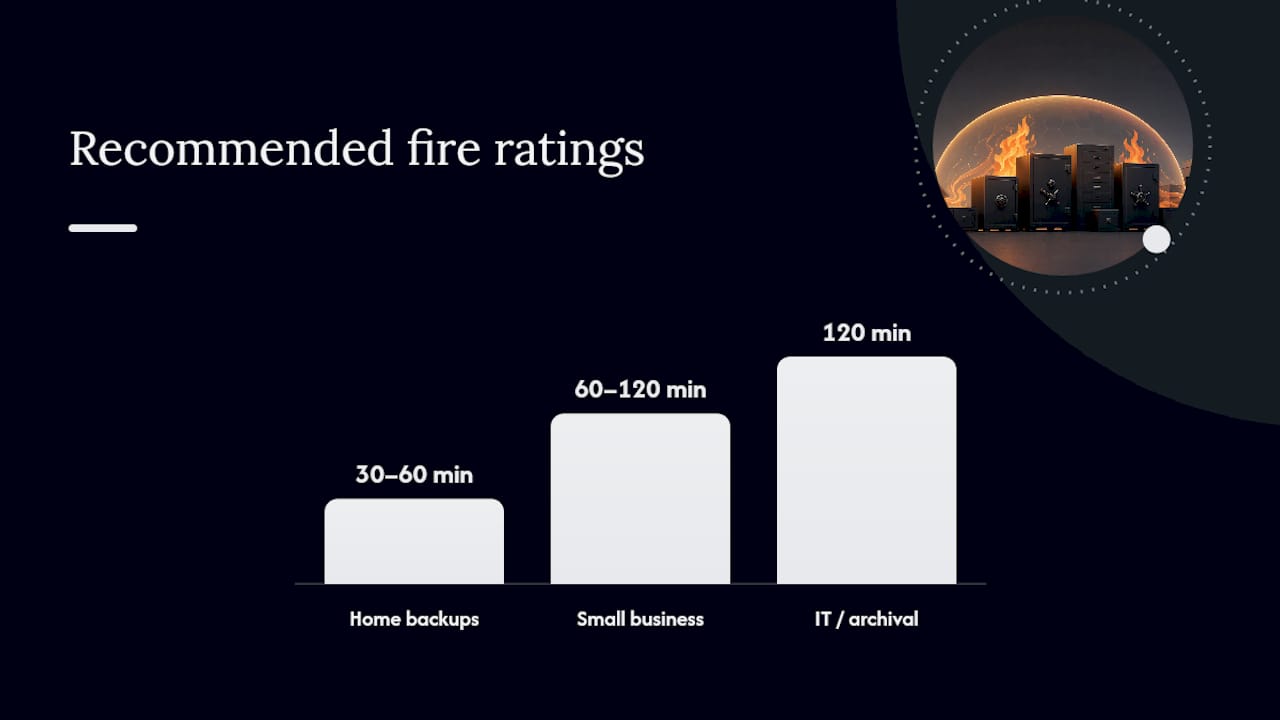
Home users backing up family photos and personal records generally do fine with a compact media-rated safe and a simple lock. A digital keypad model in the $200 to $500 range covers an external hard drive, a couple of backup discs, and key paper documents. Installation is minimal, usually just setting it on a closet floor or bolting it to a subfloor for theft resistance.
- Fire rating: 30 to 60 minutes is typically sufficient for residential response times.
- Lock: digital keypad or key lock, whichever the household will use consistently.
- Cost: budget $200 to $600 depending on capacity and certification level.
Small businesses archiving financial and client records need more duration and stronger access control. A 60 to 120-minute data-rated safe, similar to the StoreMore Media Fire Safe or a mid-tier Gardall unit, fits offices storing backup drives, signed contracts, and tax records. Mounting the safe to a concrete floor and checking with your business insurer about coverage requirements both matter here, since some policies price fire-safe coverage into premium calculations.
- Fire rating: 60 to 120 minutes for slower emergency response in commercial zones.
- Lock: digital keypad with logged access for multiple employees.
- Cost: expect $1,000 to $3,000, plus mounting hardware if bolting down.
IT departments and archival operations need the longest duration and the most capacity. A two-hour, EN 1047-1-referenced safe like the MD2175 supports server backup tapes, compliance records, and rotating offsite backup drives. At this level, pair the safe with a rotation strategy, keeping one backup set in the safe and one set physically offsite, so a single-location disaster can’t wipe out every copy.
- Fire rating: 120 minutes, aligned with enterprise data-protection standards.
- Lock: biometric or networked digital access with full audit logging.
- Cost: often $2,500 to $4,000-plus depending on capacity and certification tier.
How Do You Know These Recommendations Are Reliable?
Certification bodies exist because manufacturer marketing claims need an outside check. UL’s classification programs and Intertek’s ETL testing both put products through standardized fire, impact, and moisture tests before a manufacturer can legally use those marks. That’s not a formality. It’s the difference between a company saying “this is fireproof” and a third party proving it under repeatable, documented conditions.
Here’s what each verification path actually confirms:
- UL Classified confirms a product met a specific fire-resistance standard for a stated duration and temperature range, as verified through UL’s certification services.
- ETL Verified confirms independent testing through Intertek, commonly covering water resistance and impact performance alongside fire claims.
- EN 1047-1 is the European data-fire standard referenced by professional archival safes, built specifically around protecting digital data storage media through prolonged fire exposure.
A two-hour UL classification at 1850°F, the kind claimed on the Master Lock STW123GTCML spec sheet, tells you the manufacturer submitted the product for testing against a defined heat and duration benchmark, not that every unit off the line performs identically forever. Confirm the classification is current by cross-checking the model number against the certifying body’s own listing before you buy, and read the fine print on what exactly was measured: interior temperature, drop resistance, or both.
There are product pages available for Gardall’s certified data-media safes along with ongoing buying guidance, including a comparison of fire and water resistance across safe categories, to help buyers cross-reference specs before committing to a purchase.
What Actually Matters Once You’ve Bought a Media Safe
Buying the right safe is step one. Most media loss happens after the purchase, when the safe sits unused or the media inside goes stale.
Start with a real inventory. Know exactly what’s in the safe: which drives, which discs, backup dates. Schedule a rotation, swap or refresh backups every few months, and check that older drives still spin up and read correctly. A safe protects media from fire; it does nothing to stop a drive from failing quietly on its own over a few years.
Desiccant packs inside the safe help manage residual humidity between fire events, which matters in basements or garages where ambient moisture is already a problem. Bolt the safe down if theft is a realistic concern alongside fire, most media-rated units include pre-drilled mounting holes for exactly this reason. Keep the safe somewhere accessible enough that you’ll actually use it consistently, since a safe buried behind storage boxes tends to stop getting new backups within a year.
— Safes and Security Solutions
Where to Find the Right Media Safe for Your Situation
UL-certified Gardall data-media safes are available alongside a broader catalogue of fire and burglary-resistant safes, filing cabinets, and vault doors, allowing comparison of real product specs, not marketing copy.

Every listing includes the fire rating, internal temperature claims, lock type, and capacity up front, which means you can compare a compact home unit against a two-hour commercial-grade safe without digging through separate manufacturer sites. If you’re not sure which class fits your situation, whether that’s a single backup drive at home or a full IT archive rotation, the catalogue is organized by use case to make that comparison faster. Visit Safes and Security Direct to browse current media-safe inventory, check shipping timelines for your location, or request a quote for a larger commercial order.
Sources
- UL — Certification services
- Intertek — Testing, inspection and certification
- Media Fire Safe — StoreMoreStore product page
- Fireproof Media Safe MD2175 product page